

Display numbered photos separately and use the browser as a name-reveal key. The game does not upload, store or display the photos themselves.
How to play the browser version
Step 1
Ask willing participants for a photo and permission to show it to the shower guests. Arrange the photos on a board or your own slideshow, numbered from 1.
Step 2
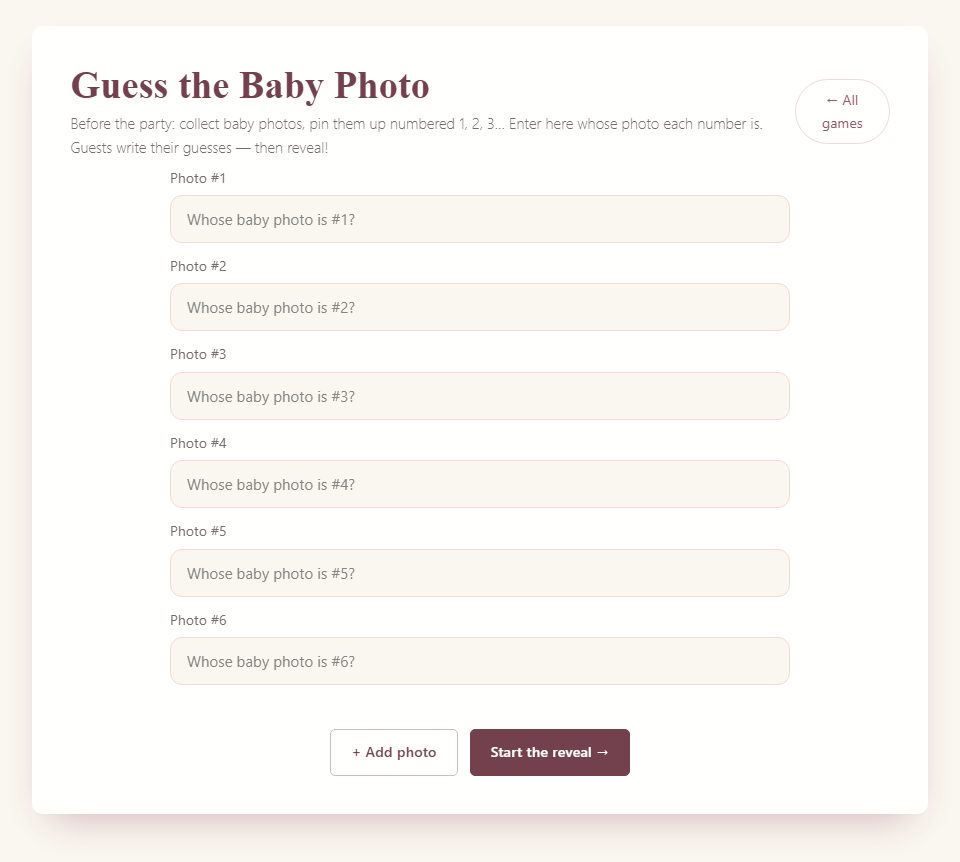
Enter matching names in browser setup. At least two are required; keep the order continuous without blank gaps.
Step 3
Give guests a numbered answer sheet or invite spoken guesses. Keep the name key private until guessing is finished.
Step 4
Reveal each name by photo number. Guests or the host tally correct matches on paper; the app does not score submitted guesses.

Host tips and optional variations
Use copies for a physical display and keep the same numbering on the photos, answer sheet and browser key.
Decide how much identifying context to give. A list of possible names helps guests meeting for the first time.
For a couple-only variation, display several ages of the same two people and repeat their names in the corresponding fields.
Frequently asked questions
Where are photos saved?
They are not saved in the game. The browser stores the entered name key locally; your photo files stay wherever you keep them.
Can guests submit answers through the game?
No. Collect answers aloud, on paper or in a separate call chat, then score them yourself.
Choosing paper games
The browser games and paid PDF packs are separate formats. A guide on this page does not mean the same game is included in a pack. Check the printable contents and page previews before buying; the packs are digital downloads that you print yourself.
 Save to Pinterest
More game rules and guides
What the browser game does and what you prepare separately
Guess the Baby Photo works by matching numbered childhood photographs to names. The browser page helps you enter and reveal the names in order. It does not upload, store, or display the photographs themselves. Prepare the actual pictures separately, using printed copies, a poster, or a slideshow. The most important preparation task is therefore not a complicated technical setup: it is making sure Photo 1 on your display corresponds to name 1 in the browser, and so on through the whole set.
Guests write their guesses independently or as teams, and the host checks them against the revealed names. The app does not automatically collect those guesses or calculate every guest's score. Keep a paper tally if you want a winner. You can also play without scores and use the reveal as a conversation starter. Both formats work, but explain which one you chose before handing out answer sheets. People approach a friendly guessing activity differently when they know whether spelling, partial names, or team discussion will matter.
Choose whose photographs belong in the round
Start with the guest list and the purpose of the game. A set featuring guests at the shower can help people connect names and faces. A smaller set featuring the couple and close family can fit a gathering where collecting pictures from everyone would take too much coordination. Neither choice is automatically fairer: distant relatives may recognize family baby pictures, while coworkers may know very few of them. Decide whether that uneven knowledge is acceptable for a lighthearted activity.
If you want broader participation, make mixed teams or supply a separate list of possible names. A name bank is a host-made aid, not a feature generated by the game. Include each intended answer clearly and decide whether names can be used more than once. For a straightforward round, use one photo per person and one use of each name. Avoid including somebody's childhood picture merely because you found it online. Ask the person or the appropriate family contact to contribute a picture they are comfortable having shown at this particular gathering.
Ask for photographs with a clear, small request
Send contributors a short message that says what you need, when you need it, and how the image will be used. For example: “We are making a baby-photo guessing game for Saturday's shower. If you would like to join, please send one childhood photo you are happy for guests to see. We will number the pictures and reveal the names at the party. Taking part is optional.” Add a deadline that leaves you time to build and check the display.
Ask for the contributor's preferred answer name in the same message. A family nickname, maiden name, or name shared by two guests can otherwise become a scoring problem later. Tell people whether pictures will be printed, shown on a screen, or included in a video call. Those are different forms of sharing, and contributors should understand the intended audience. If someone declines or does not reply, continue with the photos you have. The game does not need to include every person to be complete, and repeated requests can turn an optional contribution into an obligation.
Select pictures for recognition rather than embarrassment
Choose images in which the person is reasonably visible. A face hidden behind a toy may be charming but gives guests little to work with. A photograph containing several children can also cause confusion unless you clearly identify which child is the subject. Use a crop or a simple arrow only if the contributor approves and the result still feels respectful. Do not alter a photograph in a way that changes its meaning or invites jokes at the person's expense.
Avoid pictures that expose private details the contributor did not intend to share. A school name, address label, medical setting, or another child's face may need consideration before the picture goes on a large screen. The easiest solution is often to request a different image. Let people choose an ordinary childhood picture if they do not have a baby photograph or prefer not to use one. You can call the round “Guess Who: Childhood Photos” in your spoken introduction so the invitation matches the material without implying everyone must supply the same age or style of image.
Build a numbering system that survives setup
Give every selected picture one number and keep that number attached throughout preparation. A simple master list might read “1 — Jordan, 2 — Priya, 3 — Morgan.” Use the same numbers on the printed display, answer sheets, slideshow, and browser name entries. Do not rely on the order in which files happen to appear in a folder; sorting by file name or date can change the sequence. A numbered file name can help you keep your working copies organized.
Once the guest display is assembled, check it against the master list from beginning to end. If you remove Photo 4, renumber everything that follows or rebuild the whole sequence consistently. Leaving a missing number may seem harmless, but the browser reveal expects the names you entered in order. Ask a cohost to read the photo numbers while you read the names from your private key. This small rehearsal catches mistakes that are much harder to repair while guests are holding answer sheets and waiting for a reveal.
Enter and check the browser names
The setup begins with several name fields and allows the host to add more. Enter at least two names. Keep the list consecutive: do not leave an empty field between two completed entries. The page checks for gaps in the active list so the reveal can follow the photo numbers reliably. Use names that guests will recognize, including a surname or another clear distinction when two people share a first name. The name you enter is the answer the browser will reveal.
After saving, walk through the reveal privately and compare it with the real photo display. Check punctuation and spelling, but focus first on identity and numbering. A perfectly spelled name under the wrong photograph is still an incorrect answer key. The names are saved in local browser storage. Signed-in users can also use the same account’s backup to restore a setup where its local key is missing, but this does not merge edits or upload the photos. Signed-out preparation stays local. If you switch devices, check the final names and numbering on that device; display the actual pictures separately.
Make answer sheets that are easy to score
An answer sheet only needs a place for the guest or team name and one numbered line per photograph. Leave enough room for a full name, especially when the guest list includes repeated first names. Put the photo numbers in the same order as the display and check that the last line matches the number of pictures. You can make this sheet yourself in a document or write it by hand; the browser name-reveal tool does not automatically provide a free downloadable photo worksheet.
If you supply a name bank, place it where guests can consult it without covering their answer lines. Explain whether every name appears exactly once. You may choose to accept obvious spelling variations as long as the intended person is clear. Announce that before play, not after discovering a close score. For young guests or people who prefer less writing, a numbered name bank lets them record a letter instead of a full name. That is a manual adaptation you prepare, and it should be reflected consistently in your private answer key.
Set up a printed photo station
A printed station works well when guests arrive at different times and you want an activity they can approach casually. Display the photographs at a comfortable viewing height with clear numbers that do not obscure the faces. Keep the answer sheets and pens nearby, and add a short instruction: “Match each childhood photo to a name. Return your sheet before the reveal.” Include the reveal time so people know whether they can finish after getting a drink or greeting the bride.
Do not put the private answer key beside the display, even face down, where somebody may mistake it for another guest sheet. Keep it with the host. Leave enough space around the station that guests can look without blocking an entrance or food table. If the gathering includes people who cannot easily stand at the display, offer a small printed copy or bring the pictures to their table. Avoid attaching irreplaceable original photographs with tape or pins; use approved copies and keep originals protected if a contributor entrusted them to you.
Use a slideshow without revealing the answer accidentally
For a slideshow, place one numbered picture on each slide and keep the name off the guest-facing slide. Check file names, captions, speaker notes, and thumbnail views before sharing the screen. A slide titled “Aunt Maya as a baby” defeats the guessing even if the large caption only says Photo 6. Rehearse how you will move between the picture presentation and the browser reveal so the private name list is not shown too early.
You can show all pictures once, allow guests to write, and then return to them during the reveal. Another option is to keep a numbered overview slide visible while people finish. Both require your own presentation preparation; the browser does not assemble that slideshow. Make sure the faces remain recognizable from the furthest seat. If a picture is too small on an overview, revisit it individually. Give the same viewing opportunity to everyone instead of rewarding the guests who happen to be nearest the screen or quickest to request another look.
Introduce the game with a friendly boundary
A short host script can cover the essentials: “Everyone pictured has agreed to join our childhood-photo game. Match each number to a name and write your best guess. You can leave a blank if you are unsure. Please keep the pictures within the party rather than posting them. We will reveal the answers together, and one correct name earns one point.” Adjust the wording to match the permissions you actually obtained; do not announce consent you have not checked.
If teams are allowed, say so before guests begin. If the person pictured should keep their own identity secret, invite them to enjoy the guesses without giving hints. Do not penalize somebody who chooses not to hide their identity, however; you can exclude that photograph from competitive scoring if necessary. Keep the tone curious and kind. The fun comes from recognition and surprise, not from demanding that someone explain why they looked a particular way or share a childhood story they would rather keep private.
Decide how much guessing help to provide
A room of close relatives may need few clues. A mixed group may benefit from a list of names, current photographs supplied with permission, or teams that combine different social circles. Choose one approach that suits the guests rather than stacking several complicated hint systems. If you give a clue aloud, make sure all teams hear it. A private hint at one table can make the final result feel arbitrary even when the prize is small.
You might say, “All the people pictured are here today,” if that is true, or “Two pictures are of family members who could not attend,” if that describes your set. These basic boundaries help guests understand the possible answers. Avoid clues about sensitive family relationships, ages, adoption, or appearance unless the person has explicitly offered that detail for the game. You do not need increasingly personal clues to rescue a difficult picture. It is acceptable for a photograph to remain a mystery until the reveal, and a wrong guess does not need an explanation.
Reveal the names at a pace people can enjoy
Once guessing ends, ask guests to put down their pens or mark a clear line under their final answers. Show Photo 1 and use the browser reveal to display the corresponding name. Pause long enough for people to check their sheets and react, then move to the next photograph. Keep the actual picture visible where possible; the name alone is less satisfying if guests cannot remember which child they were guessing. The browser supplies the ordered name reveal, while you manage the separate photograph display.
Invite the person pictured to add a brief comment if they want to. A simple “That was my favorite hat” can be enough. Do not require a story from every person or let one anecdote consume the entire activity. If the reveal list and pictures do not match, stop and consult your master key before continuing. Correct the numbering openly and score the affected question fairly. Guessing at the correct identity to keep the presentation moving can turn one small preparation error into several incorrect answers.
Score kindly and finish ties without fuss
For a scored round, award one point for each correctly identified person. Accept an unmistakable nickname or spelling variation if that was part of your announced rule. If two guests share a name and an answer does not distinguish them, apply the same standard to every sheet. You can avoid that issue beforehand by giving a name bank with unique labels. Let guests mark their own sheets for a casual gathering or exchange them if the group prefers a little more structure.
Recognizing joint winners is usually the simplest tie finish. If you want a tiebreaker, prepare a separate approved picture and use the same clue for all tied players. Do not ask the guest of honor to choose a favorite answer after a points-based game. That changes the basis of the result. You can also skip prizes altogether and end by thanking contributors. The activity has already done its job if people enjoyed the reveal and learned a few names; a complicated ranking is not necessary to make it feel complete.
Adapt for a remote or hybrid shower
Use a separate meeting service to show your numbered photographs and read the instructions. The baby-photo game itself does not host a video call or collect remote guesses. Ask remote guests to write their answers privately until the reveal, then keep their own score or send a final total through your chosen meeting channel. If the event is hybrid, test whether people on the call can actually see the photographs; a camera pointed at a distant printed board is rarely a dependable substitute for sharing a clear digital copy.
Have one cohost watch the call for requests to repeat a picture or instruction while the main host manages the room. Give remote guests the same viewing time as people attending in person. Avoid showing their submitted childhood pictures to a wider audience than you described when requesting them. If someone joins late, let them watch or begin from the current photograph without making a public issue of a lower score. A hybrid game needs deliberate pacing, but it does not require pretending that every device is connected to an automatic scoring system.
Protect the pictures after the party
Decide in advance what will happen to printed copies and digital working files. Return borrowed originals promptly. If contributors asked you to remove their copies after the event, follow that request across the places you used to prepare the display. Do not promise automatic deletion by the game: the photographs were handled outside it, and the browser's saved name list is a separate piece of data. Clear or revise that local setup if you no longer need it on a shared device.
Ask before turning the finished photo board into a social-media post or sending it to a larger group. Permission to show a picture at one shower is not the same as permission to publish it widely. A photo of the table decorations without the childhood images may be an easier keepsake to share. If somebody wants a copy of their own displayed picture, return it directly rather than distributing the entire collection. Good preparation includes a thoughtful ending, especially when friends and family have trusted the host with personal photographs.
Use a final rehearsal to catch the ordinary mistakes
Before guests arrive, run one complete check in the real setup: count the photographs, count the answer lines, confirm the browser names, and test the first and final reveal. Check that the display has enough light and that the host can reach the controls without blocking it. Put the private key somewhere accessible to you but separate from guest materials. These checks are more valuable than adding extra decorative instructions that nobody has time to read during the party.
Then rehearse your transition out of the game. For example: “Thank you to everyone who shared a picture. Please finish your totals while we get lunch ready.” Collect anything that must be returned, announce the result if you are scoring, and let conversations continue naturally. Keep a spare pen and a blank answer sheet nearby for a late arrival, but do not rebuild the entire set at the last minute. A carefully numbered, modest photo collection is easier to host than a larger collection that has not been checked from beginning to end.