

Choose the wedding phrase represented by an emoji clue. The browser has 25 shuffled multiple-choice puzzles and one score per playing device.
How to play the browser version
Step 1
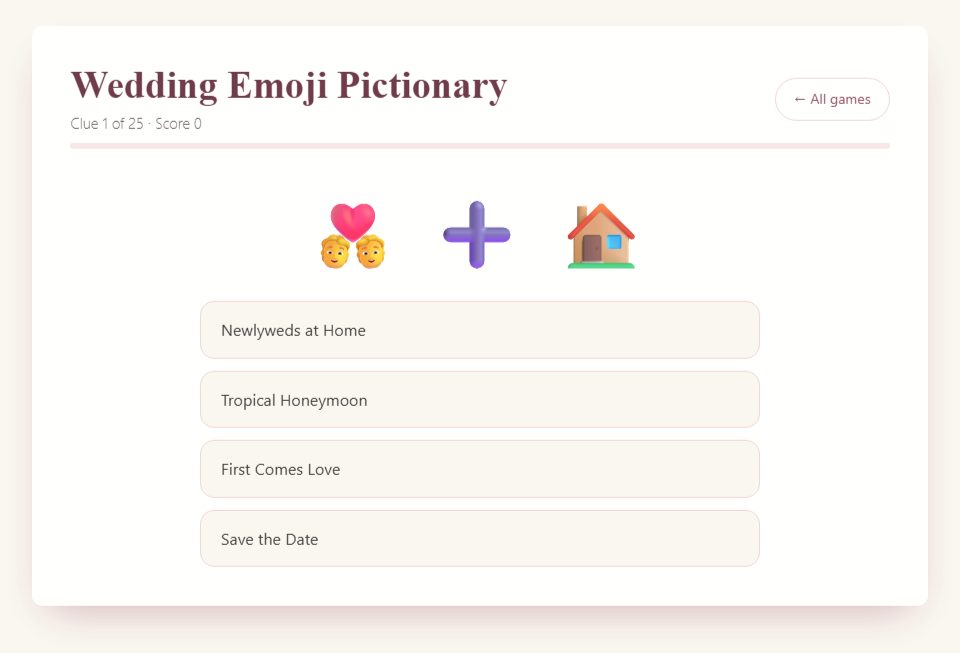
Read the clue and four choices. The moon and honey clue represents Honeymoon in this deck.
Step 2
Give the player or group time to choose. There is no countdown or separate typed-answer box.
Step 3
Tap an answer. It locks, shows the correct choice and automatically advances.
Step 4
Complete all 25 puzzles for the score and percentage. Each correct submitted answer earns one point.

Host tips and optional variations
Emoji clues can have more than one plausible interpretation, but the game scores against its predefined key. Explain this before competing.
For a table competition, collect each table’s answer before tapping one choice and keep separate totals on a host score sheet.
For a remote chat race, use a separate call chat and judge it yourself. The game does not timestamp guesses or award individual fastest-answer points.
What the emoji round asks guests to do
Wedding Emoji Pictionary asks you to interpret a group of symbols as a wedding phrase. The name can suggest a drawing game, but the browser version does not ask guests to draw. A clue appears with four possible answers. You choose the answer you think the symbols represent, see the result, and move to the next clue. That makes it useful when you want a visual puzzle without passing markers around or judging anyone's drawing ability.
Start by showing the whole clue, including any plus signs or arrows. A cake and a knife suggest an action involving a wedding cake; a bouquet with a throwing figure suggests a different part of the celebration. Some combinations are literal, while others represent an expression. Guests do not need to explain every symbol before answering. Their task is to find the closest match among the choices on that screen.
An emoji is not a precise definition. The same symbol can look slightly different on another device, and a guest may reasonably interpret a picture in a way the author did not intend. Treat the supplied answer as the game's answer, rather than proof that every other interpretation is foolish. That small distinction makes it easier to enjoy the puzzle and move past an ambiguous clue without turning the shower into an argument about a tiny picture.
Choose between individual play and a hosted group round
For individual play, each guest can open the game and work through the questions on their own device. The page records that device's answers and displays its result. This is convenient during a quiet arrival period, although it does not automatically combine everyone's scores. If you want to compare results, ask guests to report their totals and agree on the comparison rules before they start.
For a shared round, open one game on the host's screen. Guests look at the same clue and discuss it at their tables or write an answer privately. The host waits until everyone has committed, then selects an option. This is a manual hosting arrangement: the browser still records only the choices made on the host's device. Use a separate sheet if you want a score for each table.
Avoid mixing those two methods halfway through. A guest playing independently may see clues in a different order because the deck is shuffled. Asking everyone to answer question five at once will not reliably refer to the same puzzle. Shared-screen play solves that problem by giving the room one visible question. Independent play works better when the goal is personal completion rather than a synchronized competition.
Prepare the display before guests gather
Open a practice round on the screen you will actually use. Check whether the emoji are large enough from the farthest seat, then check the answer text. The clue may be easy to see while a long answer is difficult to read. If you are using a television or projector, stand where guests will sit instead of judging the display from beside your laptop.
Keep the game in view without exposing unrelated browser tabs, messages, or desktop notifications. A plain full-screen view can help, but test the controls before people arrive. You need to be able to select an answer without accidentally closing the page. Put the host's device within comfortable reach so you are not leaning across a table or turning your back on the room for every question.
Give guests who cannot easily see the images an equivalent way to participate. You can describe the visible objects without saying the answer: “There is a cake beside a knife” is different from “This is cake cutting.” Read the four options as well. If a description makes a particular clue too obvious, play it as a practice example and begin scoring with the next one.
Explain the rules in one short introduction
Try this introduction for a hosted round: “Each picture points to a wedding phrase. Look at all four choices before deciding. Write your table's answer, and keep it hidden until I ask everyone to reveal. I will then select the answer on this screen. We will keep our table scores on paper, so the number on my screen is not the room's scoreboard.” This explains the difference between the app and your event rules without a long technical speech.
For individual play, simplify it further: “Choose one answer for each clue. The game shows whether your choice matches its answer and then moves on. Please keep the screen to yourself until everyone who wants to play has finished.” That last instruction prevents someone who finishes early from calling out solutions to a person still enjoying the round.
Run one unscored example if the group seems uncertain. Let guests ask whether they should name the objects or the phrase. Demonstrating that distinction is usually more useful than repeating the rules. Once people understand the task, start the scored portion and resist adding new conditions. A simple rule that remains consistent is easier to follow than a clever rule that changes after every clue.
Use the answer choices as part of the puzzle
The four options are not an optional decoration in the browser game. They help define the intended meaning of a clue. Encourage guests to look at the symbols first, form a guess, and then compare it with the choices. If two answers seem plausible, they can discuss which one explains more of the picture rather than trying to invent the most elaborate interpretation.
For example, a picture of an envelope beside a calendar suggests a message connected with a date. In a wedding context, “Save the Date” may fit better than a general answer about invitations. The useful discussion is about the relationship between the objects. Guests can explain their reasoning in a sentence, choose, and move on; nobody needs specialist knowledge about stationery to participate.
If your guests want a harder activity, you can create a separate paper round with original emoji clues and no answer choices. Label that as your own variation. It changes the task because several phrases may be reasonable responses. Prepare accepted alternatives before playing and do not present your handwritten round as an extra difficulty setting inside the website.
Collect answers before the host clicks
The browser advances shortly after an answer is selected. In a group round, that means the host should wait until guests have finished writing before clicking. Do not click merely to check the solution while half the room is still discussing it. Once the answer is revealed, a late response cannot be treated the same way as a response committed in advance.
Use a visible signal that does not require guests to shout. Tables can place their answer sheet face down, hold a numbered card, or raise a hand when ready. Choose one method and explain it once. If one table needs a little longer on every clue, give a clear final call rather than allowing the quickest table to decide when everyone else must stop.
After everyone reveals, select the option that represents the host's agreed choice. For a manual competition, mark table results against the answer shown. The host's browser score might be lower than a winning table's score, or higher than another table's score; that is expected. It is the result of one set of clicks, not a calculation of every guest's response.
Keep a simple manual score sheet
For table play, write each table name across the top of a sheet and number the questions down the side. Award one point when a table's committed choice matches the revealed answer. A blank response earns no point. Do not introduce bonus points for fast answers unless you have planned a separate timing method and everyone understands it before the first scored clue.
Here is a fictional four-question example. Table Willow answers three correctly and leaves one blank, so it has three points. Table Maple answers two correctly and chooses a different option twice, so it has two points. Table Cedar answers all four correctly and has four points. You can read those totals aloud without explaining how the host clicked, because the paper sheet is the agreed record for the competition.
Decide how to handle a genuinely unclear clue. One practical option is to remove that question from every table's score rather than negotiate different credit for different people. If Willow and Cedar each earned a point on the removed question, their totals both decrease by one. Apply the same correction to everyone and continue; a shower game does not need a prolonged appeal process.
Make teamwork comfortable for quieter guests
An emoji puzzle can still become a loud activity if the first confident person answers every question. Give tables a brief period of silent thinking before discussion. Then ask the person holding the answer sheet to invite one other opinion before writing. This creates room for a quieter guest without requiring everyone to deliver a speech to the entire party.
Rotate the person who writes after a few clues if the table wants to share the role. Do not insist that every person use the device or read aloud. A guest might contribute by noticing a detail, suggesting an answer, or simply agreeing with the group. Participation can be useful without being equally visible, especially when people are still getting to know one another.
For guests who are learning the language used in the answer choices, allow a teammate to explain an unfamiliar phrase. The goal is to solve wedding pictures together, not to test reading speed. If a phrase is unfamiliar to much of the group, give its meaning after the reveal and keep the explanation short. You can learn a new expression and still finish the round on time.
Adapt the round for a video call
On a video call, share the game window and check that one guest can read the clue and all four options. A screenshot that looks sharp to the host may be small on a guest's phone. Zooming the browser can help, but verify that it does not push the answers below the visible area. Read the clue objects and choices aloud when needed.
Choose how guests will submit answers before revealing them. A simple approach is to ask everyone to write a letter on paper and hold it up together. Another is to ask guests to type an answer but wait for a signal before sending it in the call's chat. Those are features of your call or manual arrangements, not automatic answer collection by the game.
Allow for connection delays. A guest who hears the question late should not be treated as inattentive. Keep the pace conversational, give a clear final call, and reveal together. If the screen freezes, pause scoring for that clue. Describing the image and choices can rescue an occasional display problem, but a persistent connection issue may be a reason to switch to an entirely spoken activity.
Write a small original paper variation
If you want a second activity, create a few simple clues that refer to familiar wedding actions. Begin with the answer, then choose two or three symbols that suggest it. For “wedding cake,” you might pair a ring with a cake. For “love letter,” a heart and an envelope can work. These are suggested handmade examples, not a claim that those exact combinations appear in the online deck.
Write an answer key before printing. Ask yourself whether a different phrase would fit just as well. A heart and an envelope could also suggest a romantic message, so you might accept both in an open-answer round or offer choices that make your intended phrase clear. Avoid pun-based clues that require one particular accent unless your group has already agreed to that kind of wordplay.
Print a test copy because emoji can render differently across fonts and printers. A colorful symbol may become a dark shape on a monochrome printer. If a clue depends on a tiny detail, replace it with a clearer combination instead of expecting guests to squint. Leave enough writing space under each clue and keep the answer key on a separate page or folded away from players.
Fit the game around food and conversation
Use the round when guests can look at a screen comfortably. It is awkward to ask people to solve tiny symbols while they are carrying plates or moving between rooms. At a seated shower, a short puzzle round can fit after guests have settled and before a longer personal activity. At a casual gathering, offer individual play as an optional activity rather than stopping every conversation.
Choose your stopping point in advance. You can play the full browser round, or you can host a shorter manual competition using only the clues you decide to show. If you stop early, report a score out of the number actually played on your paper sheet. Do not describe a partially completed browser score as a finished result or change the denominator to make it sound more impressive.
Leave room for the event itself. When a guest of honor begins telling a story prompted by a clue, you can enjoy that conversation and shorten the remaining game. A planned activity is there to help the gathering, not to prevent an interesting moment from happening. Tell guests when you are playing the last scored clue so the ending feels deliberate.
Handle common interruptions without restarting everything
If someone calls out an answer too soon, do not shame them. Remind the room to keep guesses private until the reveal. For that clue, you can play without points if the answer clearly reached other tables. Apply the same decision to everyone. The next question gives the group a fresh start without losing the rest of the round.
If the host accidentally clicks an answer, explain what happened before collecting any more responses. You can skip scoring that clue and continue. Trying to reconstruct who had already decided is usually more trouble than the point is worth. A separate paper score sheet helps here because you can mark the question as unscored without changing the browser's result.
If a guest dislikes emoji puzzles, give them permission to watch or join another activity. Do not interpret a wrong answer as a lack of enthusiasm. Someone may be unfamiliar with the symbols, unable to see them comfortably, or simply more interested in conversation. A relaxed invitation keeps the activity available to everyone without turning it into a requirement for being a good guest.
Finish with a clear result and an easy transition
For individual play, let guests read their own result before asking whether they want another round. For table play, total the manual sheet, name the winning table, and mention any shared result plainly. A tie can remain a tie. If you planned one final tiebreaker, explain it before using it and avoid choosing a rule that favors the table you happen to be nearest.
Close with a specific transition: “That was our last picture. Keep your seats while we bring over dessert,” or “Leave the answer sheets here and come add a note to the wishes table.” Guests should know whether to remain seated, put away their phones, or move. A simple transition makes the game feel like part of a considered event rather than a browser activity that ends abruptly.
If you repeat the game later, remember that guests may recognize answers even though the order changes. Shuffling changes the sequence; it does not make familiar clues new. For a second gathering with many of the same people, choose a different activity or use your clearly labeled original paper clues. That keeps the challenge honest and gives returning guests something fresh to discuss.
Pack a small host kit
A hosted screen round needs very little, but keeping the useful items together saves interruptions. Put your score sheet, a pen that works, a spare pen, and any table answer cards beside the host device. If you are connecting to another display, test the cable or casting connection before the party. Keep a charger nearby rather than waiting for a battery warning during a clue.
Write the event rules at the top of the score sheet: one point per matching answer, answers committed before clicking, and any unclear question removed for everyone. That note is mainly for the host. You do not need to hand guests a page of regulations, but having the decisions in one place prevents you from improvising a different rule when a friend asks for credit.
Finally, decide who will manage refreshments while you are operating the game. If you are the only host, keep the round short enough that you can return to other tasks comfortably. A guest can help distribute pens without becoming a second announcer. Clear small roles let you concentrate on showing the clue, listening for questions, collecting answers, and revealing the result in that order.
Frequently asked questions
Do clues get harder as I play?
No. They are shuffled, not arranged by difficulty.
Can I create my own puzzles?
There is no custom emoji editor. Guests can create a separate paper or chat round.
Choosing paper games
The browser games and paid PDF packs are separate formats. A guide on this page does not mean the same game is included in a pack. Check the printable contents and page previews before buying; the packs are digital downloads that you print yourself.
 Save to Pinterest
More game rules and guides
More questions hosts ask
How can you use emoji pictionary to celebrate the couple?
Add a personal round: write the couple's story in emojis, such as the city they met in, their first date and their pet, and let guests decode it. Use it after the standard puzzles so guests already understand the format.