

A practical planning sequence
Agree on the guest list and timing with the couple. Send the call link, timezone and any simple supplies. Ask whether gifts or messages will be shared. Test screen sharing and appoint a chat helper. Plan a welcome, two short games, wishes and a clear finish; shorten the games if conversation takes longer.
Game options to consider
He Said / She Said
The browser game uses fictional sample answers. For a round about your own couple, collect their answers separately and keep your own score.
▶ Play it free →Grab-It Scavenger Hunt
Read an item prompt and give guests time to find something nearby. Offer a seated option and avoid rushing around stairs or obstacles.
▶ Play it free →Bridal Trivia
Play multiple-choice wedding questions on a shared screen. The browser scores the selected answers; keep separate totals for guests or teams.
▶ Play it free →Wedding Emoji Pictionary
Guess the wedding phrase shown by the emoji. Collect answers before revealing so an early guess does not spoil the puzzle.
▶ Play it free →Bridal Shower Bingo
Use browser Bingo for a call-out round or gift opening. Test the room and guest cards first, and agree how to handle simultaneous winners.
▶ Play it free →How Well Do You Know the Bride?
Enter the bride’s approved answers beforehand. Guests guess before the host reveals each answer. Keep separate totals for multiple guests or teams.
▶ Play it free →Start with the people, then choose the technology
A virtual bridal shower needs a clear reason for people to gather, a call they can join and a host who helps the conversation move. Begin with the guest of honor’s preferences rather than choosing a long list of online games. Ask who they want to see, whether they want gifts or messages shared and how much time they want to spend on the call. A smaller, simpler plan can be more comfortable than reproducing every part of an in-person shower on screen.
Consider where guests will be joining from and what devices they are likely to use. Somebody on a phone has different screen space from a person at a desktop computer. A guest joining from a shared room may prefer to keep a camera off or avoid personal stories. Do not require everyone to display their home or buy a particular background. Give practical choices without making guests explain private circumstances to the group.
The browser games on this site do not provide a video meeting. You need a separate meeting tool, and its current limits depend on the service and account you use. Check those details in the provider’s own information before inviting people. Avoid relying on an old assumption about a free meeting duration or maximum guest count. The game plan should fit the call arrangement you actually have, not the other way around.
Agree a format the couple wants
Choose whether the event centers on conversation, a couple of activities, gift opening or messages. These can be combined, but each needs time. If gifts will be opened, ask the couple whether they want that on camera and what will already be available to open. Do not promise that every guest’s parcel will have arrived. If public gift opening is not wanted, a thank-you or message segment can provide a clear shared focus without making guests watch an unplanned delivery discussion.
Decide whether both partners will attend and how they want to be introduced. Avoid assuming that a co-host should surprise one partner with personal questions. If a quiz uses answers supplied beforehand, explain who will hear them and get approval for the selected prompts. If the couple prefers general games, choose those without framing the decision as less personal. Guests can celebrate a couple without answering questions about their private habits.
Set a start and finish and consider whether a shorter call would serve the group better. Video events do not automatically need the length of a meal-based gathering. Include a little joining time, one clear welcome, the agreed activities and a closing. Leave room for connection delays and voluntary comments. A host who knows which optional activity can be dropped can preserve the finish without rushing the couple’s messages.
Send an invitation that is usable on a phone
Include the date, time zone, start and finish, joining link, reply method and a contact for help. If guests need a pen, paper or an everyday object, state that plainly. Keep the supply list short. Do not ask people to print a file unless you know they can, and offer a screen or plain-paper alternative. A virtual invitation should reduce uncertainty rather than create a preparation project for every guest.
Explain the intended participation level. For example: “We will have a short welcome, an optional quiz and time for wishes. You may join with your camera on or off.” Only make that promise if it matches the format you plan. If a visual activity is central, explain how an audio-only guest can still take part. Avoid vague wording such as “bring everything for games,” which leaves guests unsure whether they need props or purchases.
Send a reminder through the same dependable channel with the current link and time zone. If anything changes, name the change instead of sending a replacement graphic without context. Keep the joining details out of a public post unless the event is intended to be public. A private celebration should have a deliberate invitation process. Guests should not need to search old messages or guess which of several meeting links is current.
Assign two host roles where possible
One person can lead the welcome and activities while another watches arrivals, chat and practical questions. The second role prevents the main host from missing a guest who cannot hear or is waiting to join while reading a question. This is useful even for a modest group. If only one host is available, simplify the activities so they do not require simultaneous screen operation, private answer collection and score calculation.
Agree how the hosts communicate during the call. A brief private message or a written cue can signal that a guest needs help or the schedule is running long. Avoid discussing every technical issue aloud while the whole group waits. The helper can handle a joining question privately when possible and tell the main host only what affects the activity. Keep the task limited to helping the event; there is no need to collect unnecessary information about guests’ devices or accounts.
Give the helper the running order and the links needed for the games. If there is a personal answer key, decide who needs access and keep it off the shared window. A backup host should be able to read the next approved prompt if the main device disconnects. This does not require sharing every private message from the planning process. A concise operating note is more useful and easier to protect.

Rehearse the real setup with another person
A solo screen check cannot show exactly what a guest sees. Ask a helper to join from another device and read a sample question from the shared view. Check whether the full game window is visible, whether text is large enough and whether the host’s pointer or other windows cover the choices. If the guest uses a phone, test in that form too. Do not assume a layout that looks clear on the host’s monitor will be equally readable on every screen.
Practice switching between the call and the game without exposing private tabs or notes. Share only the intended window where the meeting tool allows it, and confirm what is visible after the switch. The precise controls vary by provider, so consult the current instructions for the service you chose. The important outcome is that guests see the game and hear the host, while answer keys and unrelated messages remain private.
Test the actual interaction you intend to use. If guests answer in chat, send a sample answer and check who can see it. If you use an invite room for Bingo or Find the Guest, have the helper join through the guest link. A successful page load is not the same as understanding how the guest returns after a refresh. Keep the rehearsal small and use invented answers rather than real personal information while testing.
Choose between a shared screen and guest devices
A shared-screen quiz lets the host operate one game while guests respond aloud, on paper or through the call. The browser score records the choices selected on that screen. It does not automatically create separate totals for everybody watching. If guests compete individually or in teams, a person must collect and tally their answers. For a casual event, agreeing on one group choice can remove that extra work.
Guest-device play makes sense for an individual puzzle or a card people need to mark themselves. Separate puzzle rounds may be shuffled differently, so they are not necessarily identical competitions. Explain how results will be compared, if at all. Do not describe every game as a live multiplayer experience simply because several people can open it at once. Independent access and shared state are different things.
Bingo and Find the Guest have invite-room flows. The host should test the room and keep the host controls on the original host browser session. Guests receive their invitation link, not the host’s private credentials. The room roster is not an automatic referee for every outcome. Bingo claims still need verification, and Find the Guest checkboxes do not verify whether a typed name really matches a prompt. State those human responsibilities during the introduction.
Run a personal quiz without revealing the key early
Collect the bride’s or groom’s approved answers in advance and enter them on the host device. Keep a separate copy in case the planned screen becomes unavailable. At the call, show each question with its answer hidden, give guests time to commit and then reveal. If using a written answer sheet, guests can score their own matches under the announced rule. If a helper checks totals, explain how they receive the sheets or reported scores.
Accept equivalent wording when that matches the rule you prepared. A quiz about a favorite food should not become a spelling competition unless the exact wording was intentionally part of the task. If a prompt was left blank, the browser omits it, so announce the actual number of played questions. Do not call a six-question round “out of eight” because the setup contains eight possible prompts. Keep the result easy to understand.
The browser He Said / She Said game uses a fictional sample key. It cannot reveal facts about the real couple without a separate host-prepared version. If you want to ask who would pack extra snacks or plan a day trip, collect the couple’s answers yourself and tally that activity manually. Introduce it as your own round. A fictional demo and an approved personal quiz can both be used, but guests should know which one they are playing.
Host Bingo around an activity guests can observe
For shower-moment Bingo, guests need a common event to watch, such as the agreed gift-opening segment or visible party moments. Start cards before that segment begins and explain what qualifies for a mark. The center square is free, and a full row, column or diagonal triggers the browser win. Random cards are not guaranteed unique. If several guests announce Bingo close together, pause and use the tie rule you agreed before the round.
Ask a claimant to show or describe the marked line so the host can verify it. The app recognizes marks on the guest’s card; it does not know whether each event actually happened on the call. Once a browser card wins, it stops accepting further marks. A new round needs a new card. Do not promise a blackout extension on the same won browser card; a paper blackout game would be a separate host-scored format.
If printing is preferred, the browser’s Print card button opens a print dialog, and paid Bingo products are downloadable files that guests or hosts print themselves. Check the product contents rather than assuming a call sheet is included. Consider whether every remote guest has access to a printer before making paper mandatory. A digital option and a clear verbal explanation can avoid excluding someone because they cannot prepare physical materials.
Use a scavenger hunt without making people rush
Grab-It Scavenger Hunt can be run through a call with one host device. The host enters player names, reads an item prompt and awards a point by tapping the selected name. The app does not recognize objects or determine who returned first from camera feeds. The host makes that judgment. Explain the search area and allow a seated or within-reach option before starting so nobody feels they must hurry through stairs or private rooms.
Choose what counts as a qualifying item before a dispute arises. A prompt such as something red can have many valid answers. The host should look for the stated quality, not decide afterward that only the most decorative object counts. If you want a creativity version, announce that different rule from the beginning. The software can record the winner you select, but it does not know which house criterion you applied.
Use Skip round when a prompt is unsuitable and End game when the group is ready to finish. Do not insist on all sixteen prompts if the call schedule is short. Keep the object-sharing brief and optional; a guest can show an item without explaining its private history. For a tie in a round, make a fair host decision before tapping because the normal round awards one point to one selected name. Final total-score ties are supported.
Plan an answer method before competitive quizzes
A public chat race is easy to describe but can reward connection and typing speed as well as knowledge. If that is not your intended challenge, let everyone write an answer privately and reveal together. Alternatively, use one answer per team through a designated recorder. Check the call’s actual options rather than assuming it has a private submission feature available to every guest. Keep the method simple enough that the helper can manage it while the game is visible.
For a shared multiple-choice game, collect guesses before the host clicks because the correct answer and next question may appear quickly. If the host clicks too early, treat the affected question consistently for everybody. You can discard it from a manual tally rather than asking guests to prove they had already decided. The on-screen score may differ from the host’s competition score, and that should be explained openly.
A cooperative quiz avoids many of these issues. Guests discuss the clue and the host selects the agreed option. The displayed score then represents the group’s selections directly. This can fit a virtual shower focused on conversation rather than prizes. There is no need to add an individual leaderboard to make the activity count as interactive. The interaction comes from the shared decision and conversation, not only from competing totals.
Build a schedule with recovery space
A sample short call might use ten minutes for joining and welcome, fifteen for a chosen activity, ten for conversation, fifteen for messages or gifts and five for closing. That totals fifty-five minutes, but it is an illustrative schedule, not a provider limit or required duration. Adjust it to the group and meeting arrangement. If you want another game, add time deliberately or replace a block rather than slipping it into the closing.
Label one part as optional. If guests have a good conversation or connection problems use time, drop that part without making the event feel unfinished. The host can say, “We are leaving the extra puzzle for another time so we can hear the messages.” This protects the agreed focus and end time. A virtual gathering benefits from knowing when the hosted portion is complete, especially for guests joining from another time zone.
Avoid a long period where remote guests only watch the couple handle something off camera. If gift opening is included, keep the objects visible and the commentary clear, or shorten the segment according to the couple’s preference. If a task takes longer than expected, acknowledge the pause rather than leaving guests wondering whether the call has frozen. A simple explanation can keep an ordinary delay from becoming a technical confusion.
Prepare three fallback levels
The first fallback is a simpler visual setup: the host reads the question aloud while keeping the same screen. This can solve a small-text problem without abandoning the activity. The second is audio-only hosting with a private list of approved questions and manual answers. The third is ending the game portion and continuing with conversation or messages. Having these options means a single technical problem does not require the group to troubleshoot together for the rest of the call.
If a guest disconnects, let the helper contact them through the agreed channel if appropriate. Do not publicly speculate about why they left. For a competitive activity, pause or apply the announced interruption rule. For a cooperative one, they can rejoin without a lost score. If the host disconnects, the helper can explain the pause and use the backup notes. Test that the helper actually has those notes before relying on that handover.
Do not ask guests to change many settings, create new accounts or install unfamiliar tools during the celebration unless they choose to and understand why. A fallback should reduce complexity. If a game cannot run comfortably, a host-read prompt or a warm message round may be enough. The event’s purpose is gathering with the couple, not proving that every planned technical feature can be made to work live.
Close and hand over any keepsakes
Tell guests when the planned call is ending and thank them for joining. Explain who will send any agreed collection of wishes, photographs or messages. Ask permission before saving or sharing identifiable images and personal contributions; being on the call does not automatically mean a guest wants a recording distributed. Keep the handover specific rather than promising a polished album nobody has agreed to make.
After the call, copy the intended messages into the agreed place and check that they arrived. The advice browser’s copy function puts text on a clipboard; it does not automatically email a keepsake. Remove irrelevant chat material and preserve the words people chose to contribute. A short follow-up can thank guests and provide the promised item without reopening the event as a long administrative thread. Finish the practical tasks so the virtual shower leaves a clear memory rather than unresolved links and missing messages.
Optional paid printable packs
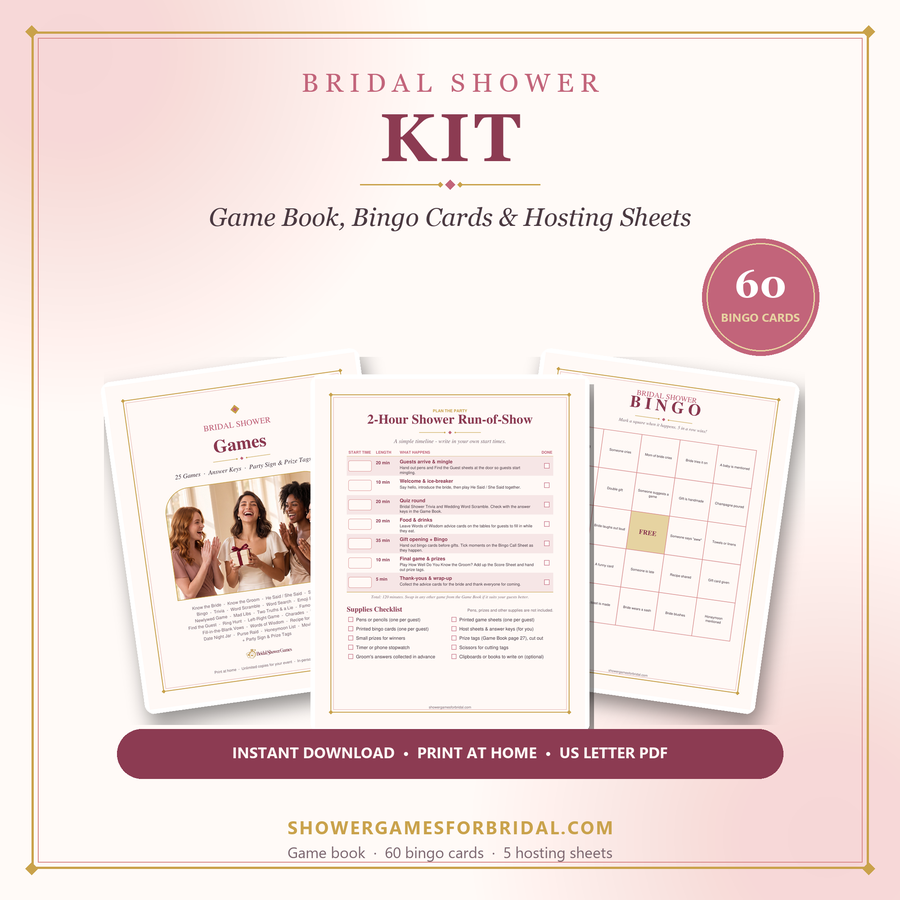
If you prefer designed paper activities, compare the paid packs below. Check each product page for its exact contents; not every browser activity has a matching printable.
For deeper planning help, see the guides on the main site: virtual & Zoom showers, funny games that aren't cheesy, games for large groups and co-ed & couples showers.