

Explain who controls what
For a shared quiz, say “Write your answer first; I will reveal the answer after everyone is ready.” Keep guest or team scores on paper. For Bingo room play, create a room and test joining with another device before sharing the invite. For individual puzzles, explain how you will compare results and handle ties.
Game options to consider
Find the Guest
Match prompts with willing guests and record their names. Explain whether a name may be used more than once, and allow seated guests to take part.
▶ Play it free →The Newlywed Game
Prepare one partner’s answers, then ask the other partner the same questions. The browser uses text answers and manual match scoring. Any recorded message must be prepared and played separately with permission.
▶ Play it free →Bridal Shower Mad Libs
Collect the requested words before revealing the story, then invite a volunteer to read the result aloud.
▶ Play it free →He Said / She Said
The browser game uses fictional sample answers. For a round about your own couple, collect their answers separately and keep your own score.
▶ Play it free →Bridal Trivia
Play multiple-choice wedding questions on a shared screen. The browser scores the selected answers; keep separate totals for guests or teams.
▶ Play it free →How Well Do You Know the Bride?
Enter the bride’s approved answers beforehand. Guests guess before the host reveals each answer. Keep separate totals for multiple guests or teams.
▶ Play it free →Bridal Shower Bingo
Use browser Bingo for a call-out round or gift opening. Test the room and guest cards first, and agree how to handle simultaneous winners.
▶ Play it free →Wedding Emoji Pictionary
Guess the wedding phrase shown by the emoji. Collect answers before revealing so an early guess does not spoil the puzzle.
▶ Play it free →Define what interactive means for your party
An interactive game gives guests a clear action to take and a visible response to that action. That can be a tap on a card, a spoken guess, a written answer, a vote or a contribution to a story. It does not automatically mean every guest has a device or that the software collects everybody’s score. Before choosing a title, decide what guests will do, where their answer goes and who decides the result. Those three questions make the setup understandable.
For example, in a shared-screen quiz the host may tap an answer after the group discusses it. The browser responds to that tap and records one score. In a paper team version, every table writes an answer and a human keeps separate totals. In Bingo, each guest marks a personal card and the host verifies a claimed winning line. All three involve interaction, but they use different controls and responsibilities. Calling them all “live multiplayer” would hide important differences.
Choose the simplest interaction that serves the gathering. More devices can create more opportunities to tap, but also more joining instructions, charging needs and chances for guests to look at different screens. A shared conversation can be highly participatory without a room code. An individual puzzle can be enjoyable without a public leaderboard. The technology should make the chosen action easier, not become the activity’s main challenge.
Compare three ways to use the site
One shared screen
A host-operated screen works when guests can see the content or hear it read aloud. It can support a collaborative quiz, a personal answer reveal, a word story or a host-controlled score tracker. One person should operate the controls so a premature tap does not reveal an answer before the group is ready. The host can invite suggestions, close guessing and then submit. This format is often straightforward for a seated group with a visible display.
A shared screen does not automatically know which guest supplied a correct answer. If teams are competing, keep a separate tally and say so. The app may show a running score, but that score belongs to its entered choices. Do not tell teams their totals are saved merely because a number appears on the screen. Decide whether the shared score itself is the result or whether a host-managed competition sits alongside it.
Independent guest play
Guests can open a puzzle on their own devices and play independently. This can work during arrivals or as an optional quiet activity. Each person controls their own screen, and some games shuffle their content. If you compare results, explain what is being compared and acknowledge that rounds may not be identical. A common game title does not guarantee matching question order, card layout or difficulty for every attempt.
Independent play does not create a synchronized event automatically. Guests may start at different times, replay or leave the page. The host should decide whether that matters. For an optional activity, it may not. For a competition, you need a clear start rule, number of attempts and method of reporting results. Keep those as explicit host rules rather than suggesting the website enforces them across every device.
Supported invite rooms
Bingo and Find the Guest have invite-room flows. A host creates a room, shares its guest link and can view the roster through the host controls. These supported rooms are distinct from opening unrelated independent puzzle rounds. Test the actual guest link with another browser session before the shower. Do not assume every other game has the same room capability because these two do.
Room access does not replace a human referee. Bingo still needs someone to verify that marked moments happened, and Find the Guest does not validate the truth of entered names or prevent every house-rule violation. The room roster is not a universal live leaderboard. Explain the supported interaction accurately: guests join and use the activity, while the host manages the social rules and event-level decisions.
Map the guest’s path before sending links
Write down the sequence a guest will follow from the invitation to playing. For a shared-screen game, it may be as simple as arriving, hearing the rule and giving a spoken guess. For a room, it includes opening the link, entering the requested name and finding the card or checklist. For a paper team quiz, it includes receiving a sheet and knowing where to submit it. Walk through that path yourself and remove unnecessary steps.
Use the actual link intended for guests. Do not send a host-control link or private credentials. The host should keep the original session available and use the guest invitation for other participants. If a helper needs to operate the host screen, arrange that handover deliberately rather than exposing access details to the whole group. A private party still benefits from clear separation between who runs the activity and who joins it.
Check whether the guest needs more than one screen. A remote participant watching a video call and marking Bingo on a phone may need to switch views. Explain that possibility and offer a printed or shared alternative when appropriate. Do not insist that every guest uses a complicated multi-tab arrangement. The most reliable plan is one the actual people can follow with the devices they have.
Match the game to the action you want
Find the Guest asks participants to talk to willing guests, enter names and check completed prompts. The browser counts checked lines, not verified conversations. Explain whether names may repeat and how a winner is chosen. For a small group, requiring a different person for all twenty-five prompts can be impossible. The host should adapt the rule instead of claiming the app enforces a unique-name requirement. A seated participant can talk with people who come to them if that fits the event.
Mad Libs asks guests to supply words before seeing the story. One operator enters the ten fields and a reader shares the result. There is no score and no automatic collection of words from every guest device. A host can ask different tables for different word types or invite people around the room. The interaction comes from contributing to the combined story, not from everybody logging into a shared form.
How Well Do You Know the Bride and Know the Groom reveal approved answers entered by the host. The guests guess before the reveal, and their points are tallied separately. Mr. & Mrs. Quiz adds host-operated match buttons for the couple’s spoken prediction. These games are interactive because people commit to answers and compare them, but the software does not recognize speech or decide whether equivalent wording counts. The host makes that judgment.

Understand quiz scoring before adding teams
A multiple-choice browser quiz receives one selected option at a time. It can mark that selection and update the screen score. It does not see a paper answer at another table or a message in a separate video-call chat. For a team competition, collect each team’s answer before selecting on screen, then award points on a separate sheet. Name the person responsible for that sheet so the host is not guessing who recorded the last result.
A worked example makes the distinction clear. Suppose three tables choose different titles for a quote. The host submits the majority choice, which is wrong. The browser score does not increase. One table had written the correct title, so that table still earns a point on the manual tally. Both results are accurate for what they measured. The host should explain this possibility at the start rather than treating the mismatch as a technical error.
If you want the screen score to be the only score, use cooperative play. Guests discuss and agree on one choice, and the host submits it. The result then represents the group’s selected answers directly. This removes separate sheets and can make a mixed group more comfortable. A cooperative format is not less interactive; it simply uses shared decisions rather than parallel competition.
Make answer submission visible and fair
Choose one submission signal. In person, teams can raise a written answer or hand a sheet to a helper. On a call, they can use an agreed chat method or write privately and reveal together. Check what the call platform actually makes visible before describing an answer as private. A public chat can show one team’s response to everybody else. If that is the chosen method, use a simultaneous send cue or accept the format as collaborative.
Close guessing before the reveal. Say, “Finish the answer you have chosen; we are submitting now.” Then tap. Some browser quizzes advance automatically after showing the correct choice, so collecting answers afterward is too late. If the host clicks early, apply the same remedy to everybody affected. Removing one question from a manual competition may be simpler than debating who had already decided before the answer appeared.
Avoid using the first visible message as a precise measure of who knew an answer first unless the group knowingly wants a typing race. Device and connection differences can affect when a response appears. For a friendly shower, a fixed answering window or a shared answer often fits better. The site does not provide a universal timestamped chat-race system across its games, so any such competition remains a host-managed variation.
Set up Bingo interaction correctly
Each Bingo card has a five-by-five layout with a marked free center. Guests tap moments they have observed, and a complete row, column or diagonal produces a win on that card. The host should explain which events count and when the round begins. Random generation does not guarantee every card is different. A guest can correct a mark before winning, but a completed winning card stops accepting further marks.
When somebody calls Bingo, pause and verify the line. The browser confirms the pattern of marks, not whether each moment happened during the shower. If two valid claims occur together, use the announced tie rule. The room roster does not automatically settle that decision. If another round is planned, start a new card. Do not promise a continued blackout round on the same finished browser card; that would need a separate paper or manual format.
Room progress is kept for the browser tab session, so keeping the tab open matters. Do not describe that as a permanent cross-device backup. Test a refresh in the guest session during preparation and explain a simple recovery plan. If someone loses a card, the host can let them start a new one or join the next round under an agreed rule. Avoid making a technical interruption feel like a personal failure to follow the game.
Use physical games as host-controlled interactions
Purse Raid lets the host award item points to qualifying players. Every eligible player can score once per item under the normal format. Guests choose what to show; the app does not inspect bags or phones. The host reads the item, verifies it and taps the relevant names. This is a clear loop of action and feedback without needing each guest to join a room. A speed variation is possible as a house rule, but it is not the default scoring behavior.
Grab-It Scavenger Hunt lets the host choose a round winner after seeing a qualifying object. The app records that choice and advances. It does not recognize the item or compare camera feeds. For a remote game, the call connects the people while the browser tracks the host’s decisions. Explain search boundaries, allow a within-reach option and use Skip round for unsuitable prompts. The activity should not depend on everybody moving equally quickly through different homes.
Ring Hunt is a forbidden-word ring tracker in this browser version. The host manually removes a ring from one player and adds it to another after a verified catch. It is not a hidden-object search or a microphone that detects banned words. Each transfer needs both adjustments. A simple physical token can help the group check the tally, but the host remains responsible for applying the rule consistently and ending the game at the agreed point.
Keep personal and fictional data distinct
An entered personal key should contain answers the person approved for the audience. Keep it private until guessing is closed, and retain a separate copy in case the playing device changes. The site supports local saved keys and optional signed-in saving, but guests should not be promised that every temporary screen state appears on every device. Test the intended account and browser setup before relying on it. Do not use live personal information merely to check whether a form accepts text.
He Said / She Said uses a fictional sample key, while Honeymoon Price Is Right uses fixed illustrative amounts. Neither should be introduced as live information about the actual couple or current market prices. Their interaction is selecting an answer in a predetermined game. A host can create a separate real-couple or real-price activity, but needs a separately prepared key and manual rules. Make that distinction visible in the introduction rather than waiting for a guest to question an answer.
Baby Photo is another useful example of a limit that matters. The browser stores a name key and reveals names by number; the host displays the photographs elsewhere. It does not upload or recognize the images. A clear instruction tells guests to look at the numbered board or slideshow and write guesses. Saying “upload your photos to the game” would send them looking for a feature that is not present.
Reduce device friction before the event
Test the pages on the device the host will use and, where relevant, one guest device. Check text size, touch targets, keyboard behavior and whether the screen remains readable when a form opens. Charge devices and arrange power where needed. Do not rely on a room full of guests all having enough battery for a long device-heavy plan. A printed instruction or a shared-screen alternative can reduce that dependence.
Keep links organized in the order you will use them. A host should not search through a browser history of preparation tests while guests wait. Label personal answer keys separately from public pages. Close unrelated tabs or notifications that could appear during sharing. These preparations do not require a complex technical checklist; they are ordinary ways to keep the guest-facing action clear and protect private material from accidental display.
Avoid changing the interaction method halfway through unless a problem requires it. Moving from paper to public chat to individual browser play changes what guests must do and how scores are interpreted. If you switch, pause and explain the new method before the next scored question. A stable simple process is easier to follow than several feature demonstrations presented as one game.
Offer meaningful alternatives
A guest can participate by speaking, pointing, writing or asking an operator to enter an answer, depending on the format. Choose alternatives that preserve the activity’s purpose without pretending every condition is identical. An assisted typing round is different from an unassisted timed attempt; a cooperative version can acknowledge that easily. A larger shared display may solve a reading issue more comfortably than requiring every guest to zoom and scroll on a phone.
For a guest who prefers not to use a device, paper answers or a spoken contribution may be enough. Do not require an account solely to make a short group activity seem more digital. The free browser games remain available without a paid online entitlement. Paid packs are separate downloadable printables, not an upgrade that creates a universal multiplayer leaderboard. Explain what a purchase actually supplies if the group is deciding between paper and screen formats.
A person can also choose to watch. Interactive does not mean compulsory input from every guest on every turn. The host can invite participation without checking who has tapped, spoken or submitted enough. A comfortable observer may join later once the format is familiar. Pressure to demonstrate engagement can make a simple party activity feel like a monitored task.
Plan for an interrupted connection or screen
Decide what happens if a device reloads during a scored attempt. Some active game states are temporary, so do not promise the same round will resume. For a timed challenge, a fresh attempt may be the agreed remedy. For a shared quiz, the host can use the paper tally already kept. For a cooperative activity, restarting may be no more than a short pause. State the rule before results matter, or choose the simplest fair response when an unexpected problem occurs.
If a room guest cannot join, have a helper check the link and explain the intended steps privately. Do not expose host access details as a shortcut. If the issue cannot be resolved quickly, offer an alternative such as sharing a nearby card or joining a later round, with the host’s scoring rule made clear. The gathering should not stop for a long technical investigation while everybody else waits.
For a remote shower, keep an audio-only fallback that uses approved prompts and manual answers. The browser does not supply the call, so a meeting problem and a game problem may need different responses. A helper can keep guests informed while the host changes the display. If the technology remains difficult, switch to conversation or messages. Completing every planned feature is less important than keeping the event understandable and welcoming.
Use a final interaction checklist
For each selected game, write five lines: what guests do, what the host taps, where answers are recorded, who verifies the result and how the round ends. Add any supplies and a backup. Read those lines aloud to a helper and see whether they could run the activity without guessing. If a line depends on an untested feature, check it before the event or simplify the plan. This gives the word interactive a concrete meaning for your gathering.
After the activity, announce the result that was actually measured: the shared screen score, the host’s team tally, a verified Bingo line or a completed cooperative puzzle. Save any promised keepsake deliberately and ask before sharing personal content. The strongest interaction plan is not the one with the most devices or controls. It is the one where guests understand their choices, receive clear feedback and can move comfortably into the next part of the celebration.
Optional paid printable packs
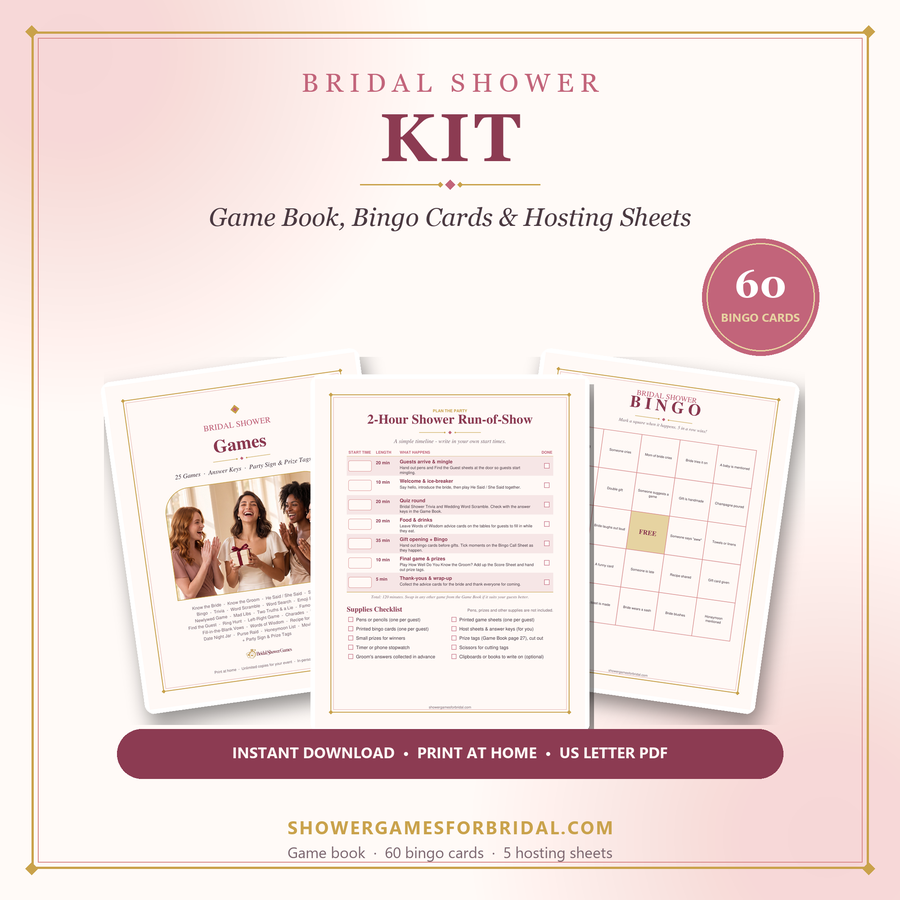
If you prefer designed paper activities, compare the paid packs below. Check each product page for its exact contents; not every browser activity has a matching printable.
For deeper planning help, see the guides on the main site: virtual & Zoom showers, funny games that aren't cheesy, games for large groups and co-ed & couples showers.