

Copy this couples guessing sheet
Write Partner A, Partner B or Both: Who packs the snacks? ____ Who picks the film? ____ Who is more likely to plan a day out? ____ Who takes more photos? ____ Who remembers to charge the phone? ____ Ask the couple to agree on answers in advance. Print that key separately and award one point per match. Names can replace Partner A and Partner B.
Game options to consider
Bridal Charades
Use the prompts for a timed acting round. Guests can volunteer to act, guess or keep score; nobody has to perform.
▶ Play it free →The Newlywed Game
Prepare one partner’s answers, then ask the other partner the same questions. Written answers work; a recorded message needs permission and separate playback outside the browser game.
▶ Play it free →Bridal Trivia
Play multiple-choice wedding questions on a shared screen. The browser scores the selected answers; keep separate totals for guests or teams.
▶ Play it free →Guess the Movie Quote
Read a movie quote and choose a title from the options. Preview the references and keep separate guest or team scores if needed.
▶ Play it free →Honeymoon Price Is Right
Choose an answer in the illustrative price quiz. Its values are game examples, not current travel or retail quotations.
▶ Play it free →Two Truths & a Lie
Enter two true statements and one invented statement. Guests vote before the answer is revealed. Only include stories the person wants to discuss.
▶ Play it free →How Well Do You Know the Bride?
Enter the bride’s approved answers beforehand. Guests guess before the host reveals each answer. Keep separate totals for multiple guests or teams.
▶ Play it free →He Said / She Said
The browser game uses fictional sample answers. For a round about your own couple, collect their answers separately and keep your own score.
▶ Play it free →Choose the kind of printable you actually need
A printable can be a plain question sheet you make yourself or a designed PDF supplied as a finished file. The free material on this page is text to copy into your own document. It is not a downloadable designed PDF. If you want to use the five-question guessing sheet above, paste it into a document editor, replace the partner labels with the couple’s names and leave space for answers. You can keep it simple. The useful part is a readable sheet that matches your approved key, not a particular decorative style.
Before choosing a paid pack, decide whether you want a personal quiz, a general puzzle or several coordinated activities. Read the product contents and page previews to see whether they match that need. A browser game listed here is not automatically included as a printable in a pack. Some browser activities involve controls or preparation that do not translate into a fixed sheet. Keep those formats separate in your plan. You can use a free browser game for one round and a paper activity for another without implying that buying the PDF is required to play online.
Personalise the free guessing sheet before printing
Replace “Partner A” and “Partner B” with names the guests will recognise. Keep the order of the names consistent on every question and on the key. Tell guests whether “Both” is an allowed answer; if the couple wants “Neither” as an option, add it before printing rather than introducing it during the reveal. Read each prompt with the couple to check that it fits their lives. A question about packing snacks may be a pleasant everyday detail, but if it does not make sense for them, replace it in your own document with an approved alternative.
Decide whose response counts when the couple has different views. They can agree on one answer beforehand, or you can tell guests they are matching one named partner’s submitted answers. Avoid presenting a difference of opinion as an error that must be settled publicly. The host sheet should identify the reference clearly. If a prompt has several reasonable interpretations, rewrite it before printing. For example, distinguish between who usually takes photographs on a trip and who enjoys taking photographs in general. Small wording changes can make the answer much easier to understand and score.
Create the host key as a separate document
Make two versions: a guest sheet with blank spaces and a host key with the approved answers. Put “HOST KEY — KEEP SEPARATE” at the top of the answer version. Include the same question numbers and wording in both. If the couple changes a question, update both versions together. Do not rely on a handwritten correction that only one co-host knows about. A helper distributing papers should be able to identify the guest copies immediately, without reading through personal answers to work out which pile is which.
Beside each answer, add accepted alternatives where needed. If guests are selecting a name or “Both,” that may be straightforward. For a free-response preference, record the level of detail you expect. A place name and a common nickname for the same place may both count. A broad category may not. Write the rule before the event so the host does not decide differently for each table. Keep any private explanation separate from the text approved for reading aloud. The key is a practical scoring tool, not a collection of every note the couple sent during preparation.
Lay out the guest sheet for handwriting
Put the title, couple’s names and short instructions at the top. Use a readable text size and enough space between questions that guests can follow the numbering easily. For a name-choice sheet, a short line may be enough. For a question that expects a phrase, leave a wider space or a second line. Add a place for the guest or team name if you intend to collect scores. Do not make the answer areas smaller simply to fit a large illustration. The sheet should be comfortable to use at a party table or on a firm lap board.
Complete one sample copy yourself before printing the rest. Write a long possible answer, such as a restaurant or destination name, and check whether it fits. If you are using a two-column layout, make sure the reading order is obvious. A single column is often easier for a host-led round because everyone follows the same number. Keep decorative elements away from the answer lines. Light borders can be attractive, but the question text should remain clear in the print settings you plan to use, including if you choose black-and-white printing.
Instructions you can adapt for your own sheet
For the five-question partner-choice sheet, you can use: “Write one of the couple’s names or Both beside each question. We will match the answers they approved before the party. One point for each match. Please keep your answers to yourself until the host says reveal. You may leave any question blank.” Change the options if you have agreed on a different set. This is copyable instruction text for your own document, not a promise about how every browser or paid printable activity is scored.
For a team version, add: “Choose one writer and agree on one answer per question.” For an unscored conversation version, replace the points sentence with: “There are no scores; we will enjoy the guesses and hear the couple’s answers.” Put only the rules you will actually use on the sheet. Including several alternatives can confuse guests about which one applies. Keep extra hosting notes on the key. A guest should be able to glance at the top of the page and understand what to write, when to stop and how the answer will be revealed.

Print one test page before the full quantity
Use the printer and paper you expect to use for the event. Open the final file and inspect the print preview. Check that no question, answer line or page number is cut off. If you made the document yourself, confirm that an accidental blank page has not been added at the end. Print one copy, then read it under ordinary room lighting. Text that looks clear on a bright screen can be less comfortable on paper, particularly if it is pale or very small. Adjust your own document before printing the guest quantity.
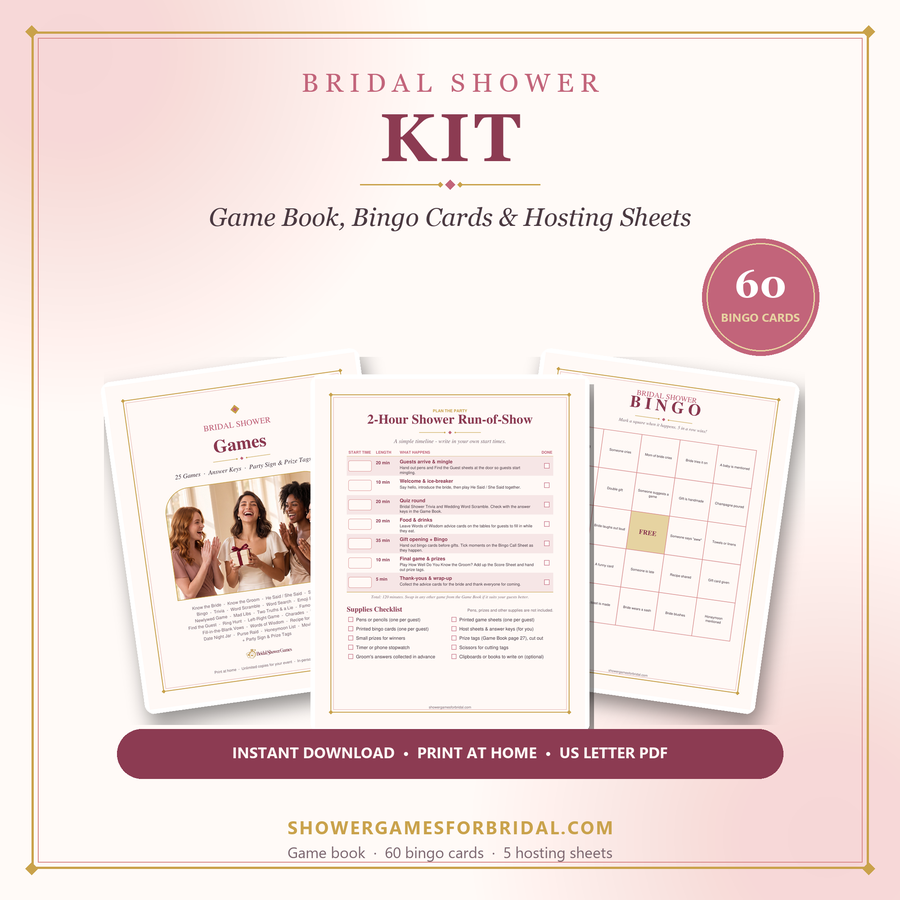
For a purchased fixed PDF, follow the file’s page size and inspect the result rather than assuming an editor is required. The Bridal Shower Kit uses US Letter pages. If you use another paper size, check the fit setting and test for clipping or unexpected scaling. Do not assume every printer has the same unprintable margins. If the output is too small, faint or cropped, resolve that on the test copy. Printing all the sheets first and checking afterwards can waste paper and leave less time to prepare the actual game.
Choose single-sided or double-sided deliberately
Single-sided guest sheets can be easier to handle during a short round because the host does not need to tell everyone to turn over. Double-sided printing can reduce the number of sheets for a longer activity, but only if the layout and instructions remain clear. Keep the host key out of a guest print selection. Accidentally placing answers on the reverse of a game sheet defeats the purpose of the reveal. Review which pages are selected before printing, especially when a PDF includes several activities and answer pages in one file.
If you choose double-sided output, test the page orientation and turning edge with one copy. Make sure the back is not upside down relative to how guests will hold it. Number the pages clearly on a document you create yourself. For a fixed PDF, inspect the existing numbering and use a simple verbal instruction if necessary. Avoid adding multiple activities to one sheet unless the group knows when to begin each. Guests may otherwise read ahead into a later round while the host is still explaining the first one.
Calculate copies from the way guests will answer
For individual play, plan one guest sheet per participant, plus a few spares. For table teams, plan one answer sheet per team, with enough copies of the questions for everyone to follow if the host is not reading them aloud. A team of six may find it awkward to share one small question sheet even though it submits only one set of answers. Decide which pages are for reading and which are for writing. This prevents a supply list that counts sheets correctly but leaves half the guests unable to see the prompts.
Keep spare pens with the spare sheets. If the activity takes place away from tables, arrange firm writing surfaces or choose a format that does not depend on handwriting. Label the host key and keep it with the host rather than in the guest pile. For several games, sort copies by activity and put them in separate envelopes. A helper can then distribute the right set without reading every page. Do not hand out all rounds at once unless you are comfortable with guests seeing later questions before the host introduces them.
A sample copy plan for twenty-four guests
Suppose twenty-four guests sit at four tables of six and you want one answer per table. You could prepare four team answer sheets, two spare answer sheets and one host key. If the host reads the five questions aloud and everyone can hear, those may be the only printed game pages you need. If guests need to read the questions themselves, add enough question copies for each table to share comfortably. The exact quantity depends on the layout and the room. This is an example of planning by use, not a universal printing requirement.
At the start, each table chooses a writer and adds a team name. The host reads the first question, gives discussion time and asks teams to put down their pens before the reveal. A helper records four totals as the round continues, or teams mark their own sheets against the key. Keep the chosen method consistent. If a late guest joins a table, they can contribute to the remaining questions without needing a separate score. If you want individual winners instead, change the copy plan before the event so every participant has their own answer sheet.
Score the paper round with the announced rule
For a partner-choice quiz, award one point when the guest’s answer matches the approved key. If the key says “Both,” a single name does not match unless you announced partial credit beforehand. Keep the rule simple. For free-response questions, accept equivalent wording consistently. If a question turns out to be ambiguous, remove it from everyone’s total rather than making separate exceptions. The host can still reveal the couple’s response and enjoy the story. A party game does not need a disputed point to remain on the score sheet.
Tell guests how ties will be handled before play. Joint winners are easy for a casual gathering. An approved spare question can also work if the group wants a single result, but use the same answer method for all tied players. Do not introduce a surprise physical challenge or a speed rule at the end of a written quiz. If guests mark their own sheets, read each answer clearly and pause long enough for them to follow. If the host collects papers, allow time to check them while guests return to conversation.
Understand the optional paid pack descriptions
The Bridal Shower Kit includes couples games such as the Newlywed Game, the Shoe Game, He Said / She Said and Famous Couples, with answer keys where a fixed answer exists. That does not mean every personal question has a universal answer supplied by the file. Questions about your own couple still require their responses where the format calls for them. The kit is a one-time $24 purchase of fixed US Letter PDFs; its quick-print files repeat book pages rather than adding new games. Use the actual contents and previews to decide what you will print rather than counting every pack name as a completely different set of games.
Choose a pack only if its contents fit the event you are planning. If the free five-question text sheet is enough, you can make and print your own version. If you want designed layouts for several listed activities, a paid file may reduce that design work. Check the download and printing guidance before the party, and open the files after downloading. A digital purchase still needs preparation time for selecting pages, printing and collecting personal answers. Keep the distinction clear when inviting guests: they do not need to buy a printable in order to play the free browser games.
Mix paper answers with a browser display carefully
You can use paper to record guest guesses while a host operates a browser game. First, check that the printed question numbers match the actual game. A custom sheet from this article does not automatically match the fixed prompts in Newlywed, Know the Bride or Mr. & Mrs. Preview the chosen browser format before making its answer sheet. If questions are shuffled, a numbered blank answer sheet may be more practical than printing a fixed sequence of question text. The host should make the current number clear each time.
Keep guest or team totals separate from the score on one host screen. The browser records actions made there; it does not know every answer written on paper. For a personal reveal, read the approved key and let guests mark their matching responses. For an illustrative price quiz, explain that the values are game examples rather than current quotations. If the group prefers your custom questions, run the paper version independently instead of trying to force it into a browser tool with different prompts. A clear format is easier to host than a hybrid nobody fully understands.
Make the printed round easy to join
Offer to read the questions aloud and give guests enough time to write. A larger-text copy can help when you control the document layout. If a fixed PDF is not comfortable for a guest to use, a plain-text version of your own approved questions or a partner who reads aloud may be a better arrangement. Do not assume everyone can write while holding a plate or balancing paper on a knee. Choose a moment when guests have a suitable surface, or use spoken guesses in an unscored round.
Make passing an ordinary option. Personal questions should come from material the couple has approved, and guests do not need to explain why they leave an answer blank. If a team includes people who know different parts of the couple’s lives, allow a short discussion so each can contribute. Avoid describing a low score as a measure of friendship. The paper sheet is a small selection of questions designed for a celebration. It should help guests learn a few things and enjoy the reveal, rather than test whether they belong in the room.
Pack the sheets so another host can find them
Put the guest copies, spare copies and pens together, with the host key in a separate marked sleeve. Add a short note stating the number of questions, answer options, scoring rule and tie plan. If there are several activities, label each envelope in the intended order. Keep a copy of your self-made document in a place you can find again, and retain the downloaded purchased files according to the access provided with the product. Do not rely on being able to retrieve a file while guests are waiting to start.
After the round, ask whether the couple wants the approved key or guest messages as a keepsake. Score sheets and private preparation notes may not be useful to them. Keep those categories separate, and ask before sharing a photograph of personal answers. If you plan to reuse your own blank template for another event, remove the first couple’s answers and names before preparing the next version. A tidy handover protects the personal material and leaves you with a practical process: clear questions, a separate key, tested printing and a host who knows how the round ends.
Optional paid printable packs
If you prefer designed paper activities, compare the paid packs below. Check each product page for its exact contents; not every browser activity has a matching printable.
For deeper planning help, see the guides on the main site: virtual & Zoom showers, funny games that aren't cheesy, games for large groups and co-ed & couples showers.