

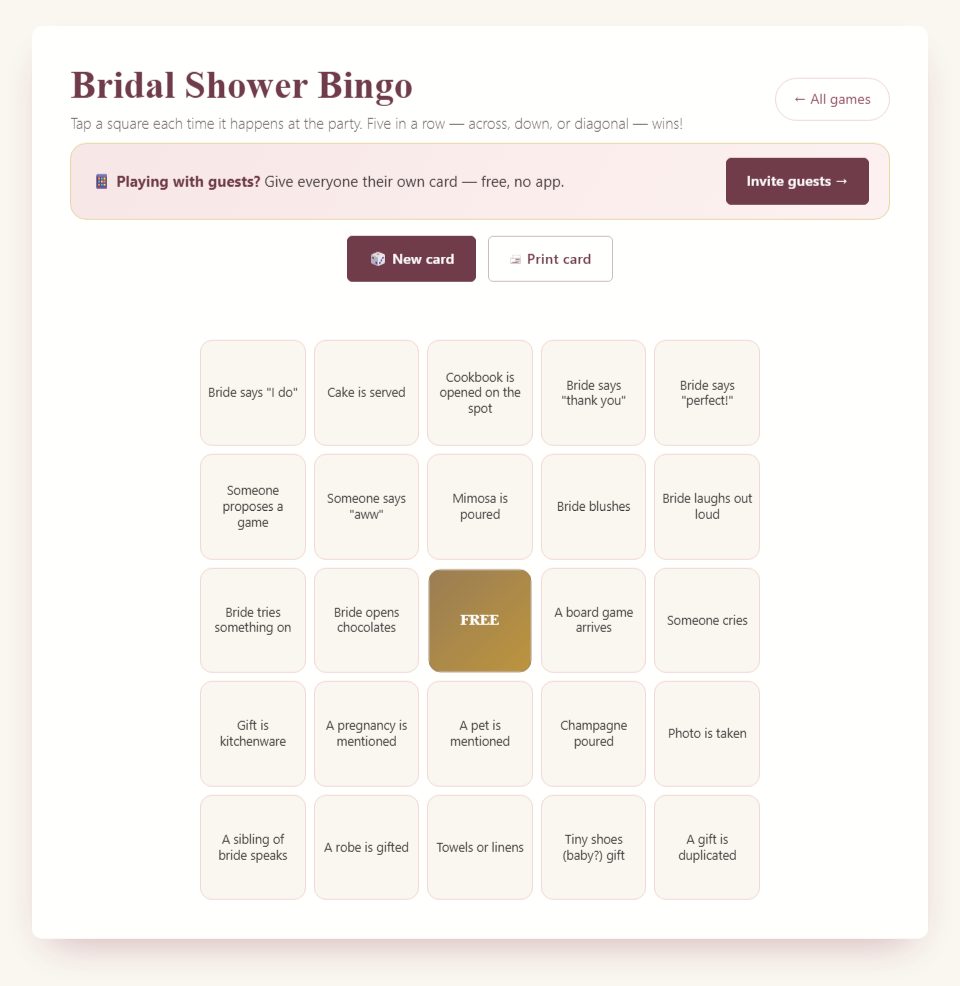
Guests mark shower moments on a 5-by-5 card. A full row, column or diagonal wins; the center FREE square starts marked.
How to play the browser version
Step 1
Open cards before gift opening begins. Each device generates a random card; uniqueness is not guaranteed. For an invite room, the host creates the room and shares its guest link.
Step 2
Explain which moments count. Guests tap squares for events they have seen and can tap again to correct a mark before winning.
Step 3
A complete line triggers the win display. The guest should call Bingo and show the card so the host can verify its events.
Step 4
A winning browser card stops accepting marks. Choose New card to start another round, or let others continue on unfinished cards.

Host tips and optional variations
The free Print card button opens the browser print dialog. Print a sample first to check size and margins.
Remote guests can watch gift opening on a separate video call while using their cards. The room roster does not automatically judge who won first.
Blackout is a paper house rule to score yourself; the browser checks five in a line. Decide in advance how to handle simultaneous valid wins.
Choose a moment-based round
This browser Bingo uses moments that may happen during a shower, such as a photo being taken, a toast being made, or a gift appearing. Guests watch the event and mark matching squares. It is not a numbered-ball game with an automatic caller. The host should explain what everyone is observing before handing out cards or inviting guests into a room.
Gift opening can provide a natural setting because many card items concern presents and reactions. However, not every shower opens gifts publicly, and not every listed moment will happen. Read a sample card before deciding whether the format fits your plans. You do not need to create an event just to satisfy a square or pressure a guest to react in a particular way.
If your celebration has no suitable observation period, choose a separate paper variation with a calling list or another game. The browser card's fixed pool of moments is not a custom-square editor. A manual adaptation can be useful, but guests should know which rules and materials belong to that adaptation rather than expecting the on-screen version to change automatically.
Understand the card layout
The card has five rows and five columns. Its center FREE square begins marked, leaving twenty-four event squares around it. The game checks for a complete horizontal row, vertical column, or diagonal. A winning line contains five marked squares, including the free center when the line passes through the middle.
The surrounding items are selected from the game's pool when a new card is generated. Cards are randomized, but the site does not guarantee that every guest receives a unique card. Two cards can share many items, and you should plan for simultaneous valid wins. Randomization is useful for variety; it is not a promise about a single winner or equal completion time.
Show the possible line directions before starting. A guest unfamiliar with Bingo may think only a horizontal row counts, or may count five marked squares anywhere on the board. Point to a row, a column, and a diagonal on a practice card. That brief demonstration prevents more confusion than a long explanation after someone calls a result.
Open cards before the observation window begins
Ask guests to open or receive their cards before gift opening or the chosen event period starts. Give them time to read the squares and ask about unfamiliar wording. Starting while people are still finding the page can mean they miss early moments through no fault of their own. A clear start gives everyone the same observation window.
Tell guests whether events that happened earlier count. A simple rule is to count only moments after the host announces the start. That avoids debates about a photo taken during arrivals or a gift already placed on a table. If you want earlier events to count, say so explicitly and make sure everyone has a fair way to know what occurred.
Keep one spare card or device available for someone who joins late. Decide whether they will participate casually in the current round or wait for the next fresh round. Do not quietly let a late player mark a list of past events while others had to observe them live. A relaxed policy is fine when it is explained consistently.
Define what counts as an observed moment
Some squares are straightforward, while others need a little interpretation. A photo being taken may include a group photograph or an individual snapshot, depending on your rule. A gift category may overlap another category. Agree on broad sensible interpretations before play, and avoid using unusually strict definitions that guests could not have predicted from the printed wording.
When one event fits more than one square on a card, decide whether both may be marked. A practical house rule can allow each clearly matching square, but the host should announce it. The browser does not inspect the event or decide category overlap. It records the guest's taps and checks the resulting pattern, so the observation rules remain a human responsibility.
Do not ask people to create personal moments for the sake of points. A square mentioning emotion or a private topic is not an invitation to make someone cry, ask about pregnancy, or reveal family news. Guests can leave such a square unmarked. The party is the real event; the card should follow it without directing uncomfortable behavior.
Demonstrate marking and correcting a square
Tap an event square when the agreed moment occurs. It becomes marked, and a second tap can remove the mark before the card has won. The free center is already marked and does not need attention. Demonstrate with a practice card so guests see the visual change and understand that a mistaken tap can be corrected during ordinary play.
Encourage players to read before tapping, especially on a small phone. A neighboring square can be selected accidentally, and a cluster of marks may look like a valid line even when one event has not occurred. Correct the mistake as soon as it is noticed. The host does not need to treat a simple touch error as dishonesty.
Once the browser detects a winning line, that card stops accepting further marks. This matters if an incorrect tap creates a win: the guest should tell the host rather than claim a valid result. The host can reject the mistaken claim and agree on a fresh card or manual continuation. Do not imply that a winning browser card can freely toggle marks afterward.
Explain the difference between a win display and a verified win
The browser recognizes a pattern of marked squares. It does not know whether the events actually happened. A guest who sees the Bingo display should call the result and show the card to the host. The host checks the claimed line against the events and the rules announced for the round before awarding a prize.
Ask the guest to identify the five squares in the line rather than reading the entire card aloud. Confirm each event briefly. If another guest saw a moment the host missed, they can clarify without turning the check into a lengthy debate. Keep the focus on the particular line and apply the same standard to every claim.
If a line contains an event that has not occurred, explain which square prevents the win. Avoid embarrassing the player in front of the room. They may have misunderstood a category or tapped by mistake. A clear correction protects the game while allowing the guest to remain part of the gathering comfortably.
Plan for tied results
Several guests may complete lines from the same event, especially when cards share items. Decide how you will handle that before the first round. Sharing recognition or having enough small prizes for simultaneous winners is straightforward. A tie is a normal possible outcome, not evidence that the cards are broken.
Avoid using the loudest shout as the automatic deciding factor. A guest farther from the host or someone who speaks quietly may have completed the line at the same time. You can ask for all claims from that event before checking them. This is particularly helpful in a larger room, where a single shout does not establish who marked a square first.
If you want one winner, prepare a separate fair tiebreaker and explain it beforehand. Do not create a rule after seeing who is tied. The browser's invite-room roster does not automatically adjudicate first place across guests, so any event-wide decision remains the host's responsibility. Keep that distinction clear when inviting people to play on their own devices.
Use an invite room without expecting an automatic referee
An invite room helps guests access Bingo through a shared room link and gives the activity room context. Each guest still uses their own card and marks moments manually. The room is not a camera or event detector, and it does not replace the host's verification of a claimed line. Explain that guests should still announce a win and show the card.
Test the guest invitation on a second device before the party. Follow the same route your guests will use and confirm that a card appears. Keep the invitation easy to find in the message or event notes. A short practice check can reveal a confusing sharing step while there is still time to explain it calmly.
Room card progress is kept in session storage for that browser tab. Keep the tab open and do not assume the card will follow a guest to another device or survive every change of browser context. This is not a permanent backup. If a guest loses the card, let them rejoin under the rule you have chosen rather than trying to invent their previous marks.
Print the free browser card carefully
The Print card control opens the browser's print dialog. Print a test before producing a stack for the shower. Check paper size, orientation, margins, and whether the complete grid appears on the page. Browser and printer settings can affect the output, so a button opening the dialog is not a guarantee that every printer will produce the same layout automatically.
Inspect the text at actual printed size. Guests need to read the longer event descriptions as well as the large Bingo heading. If a page is too small, adjust the print settings and test again. Avoid solving a layout issue by shrinking everything until it technically fits but is uncomfortable to use at a table.
If you print multiple randomized cards, check the resulting pages and keep them organized. Do not promise guests that every printed card is unique merely because you generated them separately. Paper play also needs a marker, pen, or another clear way to indicate completed squares. Have spares available so a missing pen does not delay the start.
Compare the free card with a paid PDF pack
The paid Bingo pack is a downloadable PDF with a cover and sixty cards. It does not arrive as a box of printed cards. You arrange printing and supplies yourself. Review the product preview and contents to decide whether that prepared format meets your needs. The free browser card and the paid file are separate ways to prepare the activity.
Buying a PDF does not automatically connect printed cards to an online room or verify their wins. Paper players still observe, mark, and show a claimed line to the host. The convenience is in the prepared file, not an automatic event-management service. Choose it for the actual materials it provides rather than assuming features not shown in the product description.
If you combine paper and phone players, use the same observation period, winning pattern, and verification rule for everyone. Check whether the card content fits the same events. Mixed formats can work well when guests have different preferences, but the host needs to explain one shared set of rules instead of letting each format imply its own competition.
Keep the game comfortable during gift opening
Ask guests to watch the person opening gifts, not only their cards. A brief pause after a gift is shown can give everyone time to notice and mark relevant squares. The host can describe an item clearly without making exaggerated reactions to trigger more events. The purpose of gift opening remains thanking the giver and sharing the moment.
Avoid calling out every possible square after every gift. That can overwhelm the person being celebrated and reduce the activity to a checklist announcement. Offer clarification when needed, especially if an item is hard to see, but let guests observe for themselves. A helper can answer quiet questions while the main host stays focused on the gift opening.
If the couple chooses to stop opening gifts or move to another part of the event, follow their lead. Bingo does not need to be completed at all costs. You can end without a winner, recognize the closest unfinished cards informally, or start another activity later. Do not pressure the couple to open more presents simply because no line has appeared.
Adapt for a remote shower
Remote guests can watch the celebration through a separate video call while using their Bingo cards. The game page does not provide the video itself. Before starting, check that the camera shows the relevant activity and that the host can hear a win claim. A guest seeing only a close-up face may be unable to identify gifts or other visible events fairly.
Describe important moments aloud when the camera cannot show them clearly. For example, name the gift category after the recipient has opened it. Use the same information for everyone rather than privately helping one player. Allow for connection delays before closing a round or deciding which claims came from a particular event.
Choose a win signal that suits the call. Guests can raise a hand, say Bingo during a pause, or use the call's chat. Those are manual communication methods, not automated result collection by the Bingo page. Check the card through an agreed method and keep the verification brief so the celebration does not become a long screen-sharing exercise.
Make a paper blackout variation separately
Blackout means completing the whole card, which is different from the browser's five-in-a-line win condition. The browser stops accepting marks after a line wins, so it is not designed to continue directly into a full-card blackout round. If you want that format, use paper and track it manually with rules announced before play.
Consider whether all selected events are likely to happen before choosing blackout. An observation card can contain moments that never occur at a particular shower. Requiring every square may leave the game unresolved for a long time. A manual called-word card with a prepared list may be more suitable for that specific variation, provided you explain that it is a different setup.
Do not change an ongoing browser round to blackout because someone wins quickly. Guests entered expecting a line to count, and the card's controls follow that rule. Honor the planned result, then decide whether to start a separate activity. A short round can be successful without needing to stretch it into a longer challenge.
Start a fresh round deliberately
New card creates a fresh randomized card and clears the active round's marks. Use it when you intend to begin again, not to check a result or fix a small uncertainty. Tell guests before starting a second round whether earlier events can be marked or only new events will count. A fresh card needs a fresh observation rule.
If one guest wins early, other guests can continue on their unfinished cards while the winner waits or starts a separate casual card. Decide whether further wins count toward additional prizes. Announcing that policy prevents confusion when the first winner assumes the competition is over but others are still expecting recognition.
Keep repeated rounds short enough to fit the event. Guests may enjoy one card and then prefer conversation. Offering another round is different from requiring everyone to keep playing. A clear option to set the card aside helps the activity remain an enjoyable background element rather than a demand on everyone's attention.
Prepare a host reference before guests arrive
Write down the observation window, the winning pattern, the overlap rule, and how ties will be handled. Add a reminder to verify the actual events in a claimed line. This small note is useful if a helper takes over while you answer the door or serve food. The rules should remain the same regardless of which person is holding the host device.
Keep spare paper cards or a simple alternative for guests who prefer not to use a phone. Test the print option, the invitation link if using one, and the visibility of the event area. These checks are more useful than assuming every guest has the same device, printer, or comfort with a shared-room link.
At the end, thank players, collect reusable supplies, and explain that the Bingo round is finished. A guest should not keep watching for squares after the event has moved on. Clear preparation and a clear ending let the game support the celebration, with the host providing the judgment that a pattern-checking browser card cannot supply.
Keep claims easy to hear
Choose a place for the host where guests can signal a result without shouting over the person opening a gift. If the room is noisy, ask a helper to watch for raised hands. The helper can pause the game politely and bring the card to the host. This gives quieter guests a practical way to participate and prevents a valid line from being overlooked simply because someone is seated farther away. Announce the checked result once, then let the celebration continue.
Frequently asked questions
Will refreshing preserve my room card?
Room progress is kept in session storage for that browser tab. Keep the tab open; this is not a cross-device backup.
Does the paid pack arrive as printed cards?
No. The bingo pack is a downloadable PDF with a cover and 60 cards. You arrange printing yourself.
Choosing paper games
The browser games and paid PDF packs are separate formats. A guide on this page does not mean the same game is included in a pack. Check the printable contents and page previews before buying; the packs are digital downloads that you print yourself.
 Save to Pinterest
More game rules and guides
More questions hosts ask
Is bingo a good party game for big mixed groups?
Yes. Bingo is one of the easiest party games for mixed groups because everyone plays at once, the rules need no explaining and guests can join late. It works especially well during gift opening, when guests mark items as the bride unwraps them.
Wedding bingo FAQ: how many cards and winners should you plan for?
Plan one card per guest plus a few spares. Expect several winners in a single round because many cards share the same squares, so decide beforehand whether the first to call wins or everyone with a line shares a prize. Keep small tie-break prizes ready.