

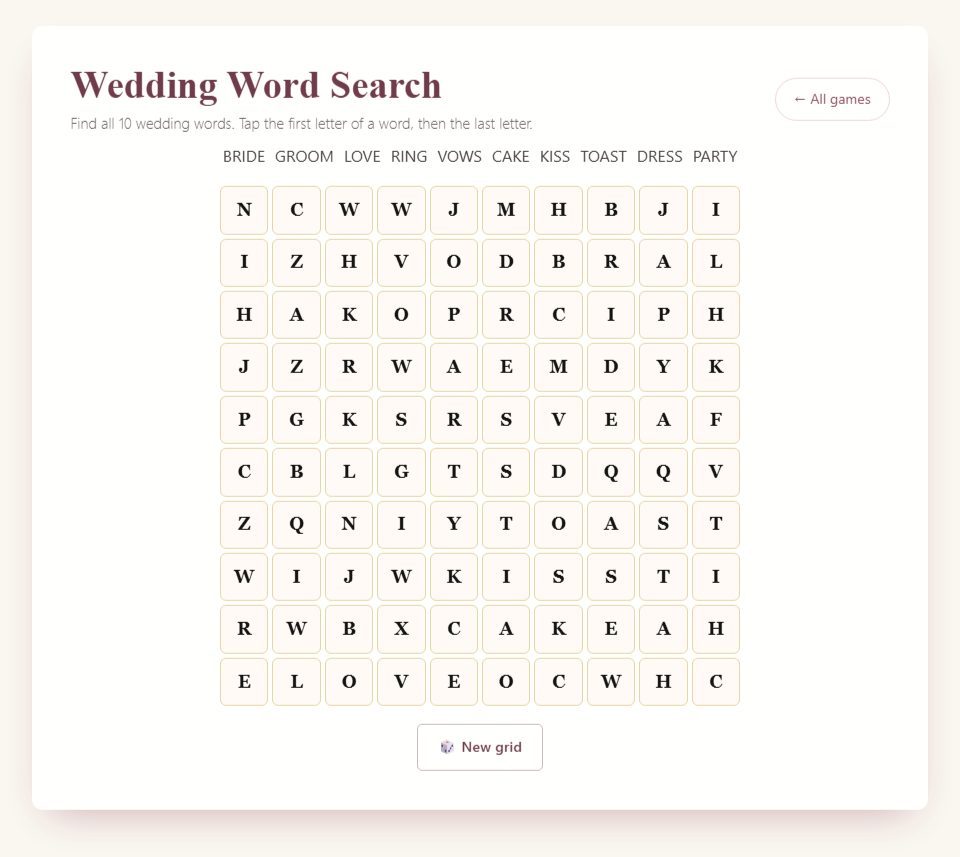
Find ten wedding words in a 10-by-10 grid. Tap each word’s first and last letters; the browser marks valid finds without a timer.
How to play the browser version
Step 1
Read the word list: BRIDE, GROOM, LOVE, RING, VOWS, CAKE, KISS, TOAST, DRESS and PARTY.
Step 2
Look along rows, columns and diagonals. Tap the first and last letters of a word; dragging is not required.
Step 3
A valid find is highlighted and crossed off the list. You can select the endpoints in either order.
Step 4
Find all ten words to finish. New grid generates another layout and clears previous finds.

Host tips and optional variations
Work in pairs and alternate after each find so both guests have time to look.
The browser does not record elapsed time. Use a separate stopwatch only if you choose a timed house competition.
Generated layouts may differ in difficulty. For a head-to-head paper race, give everyone the same prepared grid.
What makes this a useful shower activity
A wedding word search gives guests something quiet to do with a clear beginning and end. They look for the listed wedding words in a grid of letters and mark each one as they find it. It can work as a seated activity during arrivals, a short break between more social games, or a shared puzzle for two guests who would rather talk quietly than answer questions in front of the room.
The browser version is interactive. Guests select the first and last letters of a word, and a correct selection highlights the word in the grid. This is different from a paper word search, where a player draws a line with a pen. You do not need to drag your finger across every letter on this page. Explaining that small detail before play prevents much of the initial confusion.
There is no need to turn the puzzle into a race. The game does not provide a timer or a shared leaderboard. A guest can finish at their own pace, compare a difficult word with a neighbor, or leave the activity when something else begins. If you want a competitive variation, arrange the timing and scoring separately and make that change clear before people start.
Start with the word list, then explore the grid
Read the target list before tapping the grid. You are looking for those specific words, not every possible wedding-related word you can spot. Seeing a familiar short word by chance does not mean it belongs to the puzzle. The list gives you the spelling and tells you what remains to be found, so it is worth returning to it throughout the activity.
Pick one word to search for first. Look for its starting letter, then inspect the neighboring letters in a straight line. The path might run across, down, or diagonally. It can also run in the reverse direction. If the first two letters fit, keep checking the rest before selecting the endpoints. This is often less frustrating than tapping every possible starting position immediately.
Once you find a word, check the list again. A completed target is marked so you can focus on the words that remain. If several people share a screen, ask the person operating it to pause before selecting the next discovery. Another guest may still be tracing a different word, and a quick change can make it difficult for them to follow the discussion.
Learn the two-tap control
Tap the first letter of the word you have found. Then tap its last letter. The game checks the straight line between those two cells. You do not have to select all the letters in between, and you do not need to hold down a mouse button. On a phone, two deliberate taps are easier to control than a sweeping gesture across small squares.
If you select the wrong starting cell, tapping that same cell again clears the selection. Take a moment to identify the correct start before trying again. A missed tap is not a wrong answer in the usual quiz sense; it simply means the intended endpoints were not selected. The visible word list and grid remain available while you work out the next attempt.
Only a straight sequence counts. You cannot follow a word around a corner, change direction halfway through, or join separated letters that happen to spell the target. The endpoints must line up horizontally, vertically, or on an exact diagonal. A pattern that bends may look promising, but it is not one of the paths this game checks.
Understand reverse words and overlapping letters
A target can read backward from the direction you first inspect. If you recognize the last part of a word, trace it in the opposite direction before dismissing it. The game can check a selected sequence in reverse, so you can use either endpoint first when the full straight line matches a placed target. The important part is selecting the complete word, not approaching it from one particular side.
Words can share letters. A letter that is already highlighted may still belong to another target crossing through it. Do not treat a colored square as unavailable. Look at the letters themselves and compare them with the remaining word list. Overlap is one reason a nearly finished grid can still contain a word that initially seems to have disappeared.
When a correct target is found, its highlight remains visible. You do not need to record every discovery elsewhere to preserve your progress during the current round. A paper note might be useful for a manual competition, but it is not required for ordinary solo play. Keep the distinction clear between the game's found-word display and any extra event score you choose to maintain.
Use a search method instead of random tapping
One method is to scan for the least common letter in a target. If a word includes a letter that appears only a few times in the grid, inspect those positions and work outward. Another method is to look for a distinctive pair of adjacent letters. Both approaches give your eyes a smaller task than trying to recognize the entire word everywhere at once.
You can also scan the grid systematically. Start at the top-left corner, move across a row, and check possible starts as you go. Then continue with the next row. This is slower than a lucky immediate discovery, but it helps when you feel as though you have looked everywhere. A consistent route makes it less likely that you will repeatedly inspect the same area and miss another.
When you become stuck on one word, switch to another. Finding a different target can change how you see the grid, particularly around overlapping letters. There is no penalty for changing your search order. A relaxed puzzle session should leave room for experimentation rather than making guests feel that they must finish the longest or most difficult-looking word first.
Choose a place where the grid is comfortable to use
Set up the activity where guests can sit or rest a device securely. Small letter cells are harder to select while standing with a drink in one hand. A table, side counter, or comfortable seated area gives players a better chance to see the grid and tap accurately. Keep drinks away from shared devices so a casual activity does not create an avoidable spill.
Check the screen at the brightness and text size guests will actually use. If the letters are too small, try the device's normal zoom or accessibility settings and confirm that the entire puzzle remains usable. Do not assume that a grid comfortable on a laptop will be equally comfortable on every phone. Invite guests to share a larger screen if they prefer.
For a shared display, test the view from the back of the room. A word search requires more sustained attention to small details than a large multiple-choice question. If the letter grid cannot be seen clearly, use small teams with individual devices instead of asking everyone to squint at one distant screen. The activity should fit the available display, not the other way around.
Host a cooperative round for two or three people
A small cooperative group can solve one grid together without keeping scores. One person operates the device while the others suggest where to look. Ask players to describe a location before tapping: “Third row, starting near the right edge” is more helpful than pointing vaguely and saying “There.” The operator can confirm the letters and select the endpoints once the group agrees.
Rotate the operator if everyone wants a turn, but do not require a guest who finds tapping difficult to take that role. Someone can contribute by reading the remaining targets, spotting reverse spellings, or checking a diagonal. These are genuine parts of solving the puzzle. A cooperative format lets people contribute differently without comparing how quickly they use a touchscreen.
Avoid grabbing the device from another person after seeing a word. Give a clue instead: “Try checking the lower half for the first letter.” If the player asks for the exact location, share it. This keeps the puzzle collaborative while preserving the satisfaction of finding a target. The same approach works when an adult and a younger guest are playing together.
Add a manual competition only if the group wants one
If you choose to time a round, use a separate timer and explain that it is your hosting rule. The website does not measure the guests' finishing times for you. Decide when the clock starts, what counts as completion, and how players will signal that they are done. Keep the rules visible on a small note so late arrivals receive the same explanation.
Generated grids can differ, which makes a strict race between separate devices less controlled than a race using identical paper puzzles. One person may find their particular layout easier. For a casual shower, you can acknowledge that variation and treat the result lightly. If equal layouts are important to you, prepare a separate identical puzzle for everyone instead of claiming the browser guarantees identical grids.
A gentler variation is to give teams a shared amount of time and celebrate the words they found. For example, after your chosen interval, ask each team to stop and report the number of completed targets visible in its own game. Record those totals manually. Do not call this an app leaderboard or imply that the page has collected results from every device.
Use clues without giving away the whole word
When a guest asks for help, start with the smallest useful hint. You might suggest looking for the first two letters, checking a reverse direction, or scanning a particular half of the grid. A hint about the search process can help the guest continue independently. Pointing directly at both endpoints should be reserved for someone who wants the answer or is ready to move on.
If two people disagree about a diagonal, count the movement between endpoints. A valid diagonal advances one row and one column at each step. If the path needs to move two columns on one step and one on another, it is not straight. Explaining that once can resolve repeated near-matches without making the person feel that the interface is rejecting a word arbitrarily.
For a manual competition, decide whether hints are allowed before starting. Cooperative play can use unlimited help; a scored round may need a common rule. One option is to offer the same general hint to everyone. Another is to make the activity unscored when a table needs substantial assistance. Choose the approach that suits the gathering instead of inventing penalties after someone asks a question.
Plan a paper alternative honestly
If you want paper copies, prepare a separate printable puzzle in advance. This guide does not promise that the browser game has a dedicated PDF export or print button. Printing a web page through a browser is not the same as receiving a designed worksheet, and the result may include cropped cells or unrelated page elements. Test a copy before relying on that method for guests.
For a handmade puzzle, write your target list first and place each word in a blank grid. Keep a separate answer key showing every location, then fill the remaining cells with letters. Check the completed puzzle against the key rather than assuming every word survived the process. A second person can test it without seeing the key and tell you whether the letters are readable.
Use a clear font, enough space between cells, and a word list with matching spellings. Leave decorative graphics outside the grid so they do not obscure letters. Print an extra copy for the host and keep the answer key separate from guest sheets. This preparation is a manual alternative; it does not change the controls or content of the online game.
Fit the word search into the shower schedule
During arrivals, make the puzzle optional. A small sign or a brief invitation is enough: “There is a wedding word search here if you would like something to do while everyone arrives.” Guests who are catching up with friends should not feel that they are missing an instruction. The activity can occupy an early arrival without dividing the room into players and nonplayers.
During a seated break, give a clear start and a gentle stopping point. Explain that people can finish later if the next part of the shower begins. Avoid starting a competitive timed round just before food service or a planned toast. Guests should not have to choose between completing a word and paying attention to the person being celebrated.
At the end, acknowledge effort without ranking everyone. “You found the last tricky diagonal” or “That table solved it together” is more specific than declaring that some guests are good or bad at puzzles. Then explain what happens next. A quiet activity benefits from a clear transition because there may not be a loud final answer that naturally brings everyone's attention back.
Avoid losing a round by accident
The New grid control starts a fresh puzzle. Use it when you intentionally want another round, not as a way to ask for a hint or check the current answer. If guests are sharing a device, make sure everyone understands that starting again resets the active puzzle's progress. A person still searching for the last word may be disappointed if someone else changes the grid unexpectedly.
Keep the game tab open while playing and avoid unnecessary refreshes. If a device needs to be handed to another guest, place it somewhere stable before passing it. You do not need a complicated account process to enjoy a casual puzzle, but ordinary care with the active page helps prevent interruptions. If the page is lost, treat a new round as a new puzzle rather than trying to reconstruct a claimed completion time.
If a guest wants another challenge after finishing, start a new grid only when they are ready. Explain that a new layout can change where the words appear. Someone who remembers a location from the previous round should return to the target list and inspect the new letters. Familiarity with the vocabulary remains useful, but memorizing one grid is not the same as solving the next.
Troubleshoot a selection that does not register
First, check both endpoints against the word list. A neighboring square can be selected by mistake, especially on a small screen. Count the letters between the endpoints, including the first and last. If the length does not match the target, adjust the selection. The word may be visible, but a tap one cell beyond its ending will create a different sequence.
Next, check that the path is straight and that you are using the exact target spelling. A plausible variation is not necessarily one of the placed words. Look for another instance if the same short sequence appears elsewhere in the grid. Do not repeatedly tap faster; slow, deliberate endpoint selection makes it easier to see whether the problem is the path or the touch position.
If the interface remains difficult for a guest, change the arrangement rather than insisting they continue. A larger device, a teammate operating the controls, or a paper alternative may be more comfortable. The purpose is to offer a pleasant puzzle, not to test dexterity. A guest who can identify the word but cannot tap it accurately has still solved the search problem.
Prepare a simple host note
Write down the few facts you may need to explain: use the listed words, tap the first and last letters, look in straight directions, and expect overlapping or reversed words. Add a reminder that New grid starts again. These details are enough for most guests. Keeping the note beside the activity saves you from giving a different explanation every time someone arrives.
If you are using a manual timer or scoring sheet, keep those rules on a separate line. That distinction matters because another guest may open the same game later and expect a timer that was only part of your event. Say “We are using a five-minute timer for this round” rather than “The game gives you five minutes.” Your chosen duration is a hosting decision, not a built-in limit.
Finally, decide whether the puzzle is a main activity or a background option. A main activity needs a visible introduction and conclusion. A background option needs a comfortable place and permission to leave it unfinished. Both can work, but combining them without explanation can leave guests unsure whether they should stop talking and pay attention. A clear invitation makes the word search easier to enjoy.
Close the activity without pressure
An unfinished grid can stay unfinished. If dessert, photographs, or a conversation becomes more interesting, invite guests to set the puzzle aside. Keep a spare seat at the activity table for anyone who wants to return later. That flexibility is especially useful when people arrive at different times and cannot all begin together.
Frequently asked questions
Does the app track completion time?
No. It is an untimed puzzle with a found-word list, not a timed leaderboard.
Is there a Print card button?
No. That button belongs to Bingo. For paper word games, compare the actual printable pack previews and contents in the shop.
Choosing paper games
The browser games and paid PDF packs are separate formats. A guide on this page does not mean the same game is included in a pack. Check the printable contents and page previews before buying; the packs are digital downloads that you print yourself.
 Save to Pinterest